
Maynilad recovers 117MLD in 2014

Maynilad Water Services, Inc. (Maynilad) recovered more than 117 million liters of water per day (MLD) in 2014, successfully reducing its Non-Revenue Water (NRW) level to 33%. The water recovered—equivalent to filling up 47 Olympic-size swimming pools—is enough to supply the water needs of some 491,400 people. Maynilad’s accomplishment was achieved after it replaced some […]
Maynilad installs 152km of pipes in 2014
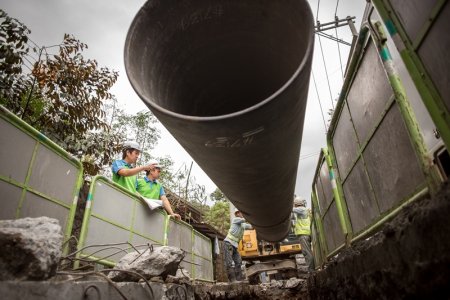
West Zone concessionaire Maynilad Water Services, Inc. (Maynilad) installed 152 kilometers of water pipes in 2014, increasing its water distribution line to 7,458 kilometers—63% longer than the length of the distribution network it inherited when the MPIC-DMCI Consortium took over operations in 2007. Maynilad’s pipe-laying projects have enabled it to expand its customer base to […]
Maynilad assists Pasay fire victims

West Zone concessionaire Maynilad Water Services, Inc. (Maynilad) quickly extended assistance to families who lost their homes in the fire that razed 300 houses last February 16, 2015 in Barangay 201, Merville Access Road, Pasay City. Maynilad distributed 300 pieces of five-gallon water jugs to the affected families and stationed a 10-cubic meter (10,000-liter) water […]
Maynilad’s Talayan stp inauguration
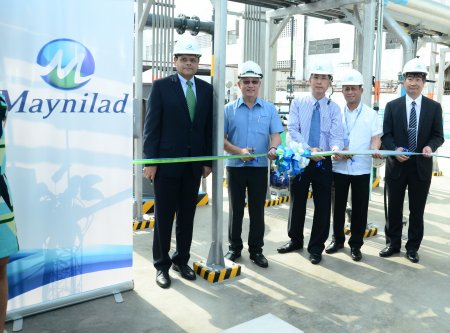
Maynilad Water Services, Inc. (Maynilad) recently inaugurated the P249-million Talayan Sewage Treatment Plant (STP) located in Barangay Sto. Domingo, Quezon City. Present during the ribbon-cutting were Maynilad Chief Operating Officer Herbert Consunji (2nd from left). With him are (from left) World Bank Task Team Leader Sudipto Sarkar, Land Bank of the Philippines Head of Project […]
Maynilad hikes water recovery CAPEX by 45% in 2015

Maynilad Water Services, Inc. (Maynilad) has allotted almost P3.2 billion in 2015 to reduce Non-Revenue Water (NRW) in the West Zone of the Greater Manila Area—a 45% increase from the company’s NRW capital expenditure of P2.2 billion in 2014. Of the said amount, almost P2.1 billion would be dedicated for selective pipe replacement in the […]
Maynilad inaugurates P249M Talayan STP
West Zone concessionaire Maynilad Water Services, Inc. (Maynilad) inaugurated its P249-million sewage treatment plant (STP) today, February 3, 2015, in Talayan, Quezon City. The new treatment facility will provide wastewater services for over 27,000 households from Barangays Balingasa, Balong Bato, Damar, Maharlika, Manresa, Masambong, Pag-ibig sa Nayon, San Jose, Sienna, St. Peter, Talayan and Unang […]
Maynilad receives 100% water quality compliance rating
West Zone concessionaire Maynilad Water Services, Inc. (Maynilad) maintained 100% satisfactory compliance with the Philippine National Standards for Drinking Water (PNSDW) of the Department of Health (DOH) for the entire year of 2014. Since 2010, Maynilad has consistently received 100% satisfactory compliance rating for water quality across its concession area. Every month, water samples taken […]
Maynilad gains ISO for IT service management
Maynilad Water Services, Inc. (Maynilad) received an ISO certification for its Information Technology Services (ITS) Division, making it the first water company in the Philippines to gain the ISO/IEC 20000-1:2011. Awarded by TUVRheinland Philippines, Inc., the ISO/IEC 2000-1:2011 verifies that Maynilad meets international standards for IT service management systems. The certification is also the water […]
Maynilad earmarks P17.3 billion for 2015 infra projects
Maynilad Water Services, Inc. (Maynilad) is investing some P17.3 billion this year for water and wastewater infrastructure projects. More than P6.5 billion—or over one-third of Maynilad’s capital expenditure program—has been allotted for wastewater management projects. This includes the construction of wastewater treatment plants and conveyance systems in Cavite and Central Manila. To further reduce water […]
Maynilad anti-dengue campaign reaches 1,000 families
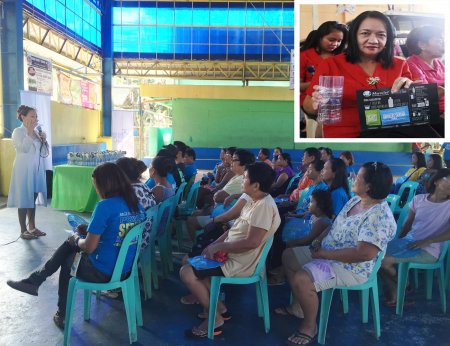
West Zone concessionaire Maynilad Water Services, Inc. (Maynilad) holds a series of anti-dengue workshops for some 1,000 families to help curb dengue cases in Metro Manila with the use of a simple Do-It-Yourself Anti-Dengue Mosquito Trap. Together with the Department of Health (DOH) and Y&R Philippines, Maynilad is visiting 10 barangays in Muntinlupa, Parañaque […]
