
Maynilad uses cookies to improve our website and enhance your browsing experience. Read our Cookie Notice.

Maynilad CAPEX to reach P8.4B in 2012
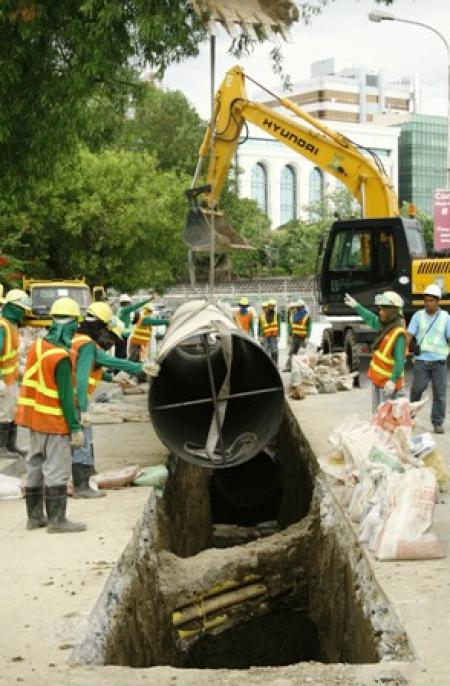
West Zone concessionaire Maynilad Water Services, Inc. (Maynilad) has allotted around P8.4 billion this year to improve and expand its water and wastewater services for its customers. This capital expenditure budget will be funded by a combination of corporate loans and internally generated funds. Some P2.7 billion will go to boosting Maynilad’s sewerage and sanitation […]

Maynilad offers septic tank cleaning

This February, Maynilad will offer septic tank cleaning services to its customers in select parts of Manila, Quezon City, Caloocan, Valenzuela, Malabon, Manila, Las Piñas, Parañaque, and Cavite City at no extra cost.   Maynilad customers in Brgys. 702, 704 – 707, 710 – 711, 714 and 726 at District 5 in Malate, Manila; Mapayapa […]

Maynilad honors stakeholders

West Zone concessionaire Maynilad Water Services, Inc. (Maynilad) honored government officials and private citizens who played key roles in the company\’s service expansion and modernization program. During the celebration of its 5th anniversary as a re-privatized company, Maynilad gave special awards to Parañaque mayor Florencio Bernabe Jr., for facilitating the swift implementation of the company\’s […]

National workshop on water efficiency measures slated

Water and environmental professionals from all over the country gathered this month to enhance their capacities on water accounting methods for sustainable water resource management in the Philippines.   Organized by the United Nations Environment Programme (UNEP) and in cooperation with the Korea International Cooperation Agency (KOICA), National Water Resources Board (NWRB), and the Philippine […]

Maynilad connections reach 1M
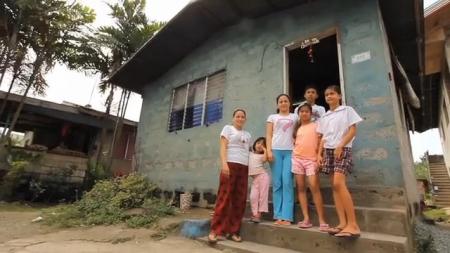
Metro Pacific and DMCI-led Maynilad Water Services, Inc. (Maynilad) recently connected its one millionth water service account, effectively raising its total number of service connections by 48% since it changed owners in 2007. Prior to the re-privatization of Maynilad, the company only had 677,985 water service connections across its concession area.   The significant increase […]

Maynilad marks fifth year of reprivatization; significantly improves services

West Zone concessionaire Maynilad Water Services, Inc. (Maynilad) recently marked its 5th anniversary as a re-privatized company.  It was on January 24, 2007 when ownership and management of Maynilad was formally transferred to Metro Pacific Investments Corporation and DMCI Holdings, Inc., two of the biggest conglomerates in the country today. In its first five years […]

Maynilad offers septic tank cleaning

This January, Maynilad will offer septic tank cleaning services to its customers in select parts of Quezon City, Manila, Caloocan, Valenzuela, Malabon, Muntinlupa, Las Piñas, Parañaque, and Cavite at no extra cost.   Maynilad customers in Brgys.702, 704 to 706, and 710 of Zone 77, Brgys, 707, 711, and 714 of Zone 78, and Brgy. 726 […]

Water Districts enrol at Maynilad Water Academy

The Maynilad Water Academy recently held a series of workshops for participants from several local water districts and private water service providers.   Representatives from Subic Water, Balibago Water and Prime Water participated in the course on “Water Safety Plan (WSP)” held from December 13 to 14. Spearheaded by Engr. Francisco Arellano, Maynilad Head of […]

Maynilad assists Cagayan Water District

West Zone concessionaire Maynilad Water Services, Inc. (Maynilad) has been assisting the Cagayan De Oro Water District (COWD) in providing potable water to the calamity victims in Cagayan De Oro City (CDO). Maynilad is also coordinating with COWD Chairman Joel Baldelovar to monitor the water supply situation and requirements in the area.   Through the […]

Maynilad and Smart help CDO victims

West Zone concessionaire Maynilad Water Services, Inc. (Maynilad) and Smart Communications (Smart) yesterday sent around 2,000 pieces of bottled water and 300 five-gallon containers with potable water to the flood victims in Cagayan De Oro City (CDO), through the assistance of the CDO Water District, Department of Social Welfare and Development, Office of the Department […]

Maynilad uses cookies to improve our website and enhance your browsing experience. Read our Cookie Notice.

Bank of Commerce

ONLINE BANKING

Steps/Procedures Unavailable

MOBILE BANKING

Steps/Procedures Unavailable

BancNet

ONLINE BANKING

Steps/Procedures Unavailable

MOBILE BANKING

Steps/Procedures Unavailable

BDO

ONLINE BANKING

1.) Visit www.bdo.com.ph
2.) Click Online Banking Log in
3.) Click on Enroll Now
4.) Read the Terms and Conditions.
5.) Fill out the needed information
6.) Click Submit

MOBILE BANKING

1.) Download the BDO Personal Banking
2.) Click on Enroll Now
3.) Read the Terms and Conditions.
4.) Fill out the needed information
5.) Click Submit

BPI

ONLINE BANKING

1.) Go to BPI Expressonline (www.bpiexpressonline.com) then click on “Enroll Now”.
2.) Select your location from the options provided.
3.) Read the Terms and Conditions.
4.) Submit your deposit account information.
5.) Fill out the EOL REgistration Form.
6.) A confirmation page will appear.

MOBILE BANKING

1.) Download the BPI Mobile App
2.) Click on Log in
3.) Click on Register Now
4.) Read the Terms and Conditions.
5.) Fill out the needed information
6.) Click Submit

LandBank

ONLINE BANKING

1.) Visit www.lbpiaccess.com.ph
2.) Click on Enroll now
3.) Read the Terms and Conditions.
4.) Fill out the needed information
5.) Click Submit

MOBILE BANKING

1.) Download the Landbank Mobile App
2.) Enroll on lbpiAccess.com
3.) Use the log-in credentials to access the App

EastWest Bank

ONLINE BANKING

1.) Visit www.eastwestbanker.com
2.) Click Log in now and then Personal Account
3.) Click Sign me up
4.) Read the Terms and Conditions.
5.) Follow the steps and fill out the needed information
6.) Click Submit

MOBILE BANKING

1.) Download the Eastwest Mobile Banking App
2.) Click on Sign me up
3.) Read the Terms and Conditions.
4.) Fill out the needed information

MetroBank

ONLINE BANKING

1.) Visit personal.metrobankdirect.com
2.) Click on Sign up now
3.) Read the Terms and Conditions.
4.) Select the account that you would like to enroll
5.) Fill out the needed information
6.) Click Submit

MOBILE BANKING

1.) Download the Metrobank App
2.) Click on Sign up
3.) Read the Terms and Conditions.
4.) Fill out the needed information

Chinabank

ONLINE BANKING

Steps/Procedures Unavailable

MOBILE BANKING

1.) Download the CBS Personal App
2.) Click on Sign up
3.) Read the Terms and Conditions.
4.) Fill out the needed information

PSBank

ONLINE BANKING

1.) Visit www.psbank.com.ph
2.) Click Log in then Personal
3.) Click Register Account
4.) Read the Terms and Conditions.
5.) Fill out the needed information
6.) Click Submit

MOBILE BANKING

1.) Download the PSBANK Mobile App
2.) Click on Sign up Now
3.) Read the Terms and Conditions.
4.) Fill out the needed information

Security Bank

ONLINE BANKING

1.) Visit www.securitybank.com
2.) Click on Log in
3.) Click Enroll Now
4.) Read the Terms and Conditions.
5.) Choose the type of account to enroll
6.) Fill out the needed information
7.) Click Submit

MOBILE BANKING

Steps/Procedures Unavailable

UnionBank

ONLINE BANKING

1.) Visit www.unionbankph.com
2.) Click on UnionBank Online
3.) Click Sign Up Now
4.) Read the Terms and Conditions.
5.) Choose the type of account to enroll
6.) Fill out the needed information
7.) Click Submit

MOBILE BANKING

1.) Download the UnionBank App
2.) Click on Sign up with My Existing Account
3.) Read the Terms and Conditions.
4.) Choose the type of account to enroll
5.) Fill out the needed information

RCBC

ONLINE BANKING

1.) Visit www.rcbc.com
2.) Click on Log in Personal Online Banking
3.) Click Enroll Now
4.) Fill out the needed information
5.) Click Submit

MOBILE BANKING

1.) Download the RCBC App
2.) Click on Register
3.) Read the Terms and Conditions.
4.) Fill out the needed information

UCPB

ONLINE BANKING

1.) Visit www.ucpb.com
2.) Click on Connect Log in
3.) Click on New User
4.) Read the Terms and Conditions.
5.) Fill out the needed information
6.) Click Register

MOBILE BANKING

1.) Download the UCPB App
2.) Click on Enroll Now
3.) Read the Terms and Conditions.
4.) Fill out the needed information
5.) Click Register