
Maynilad repairs over 22k leaks as of Q3 2016
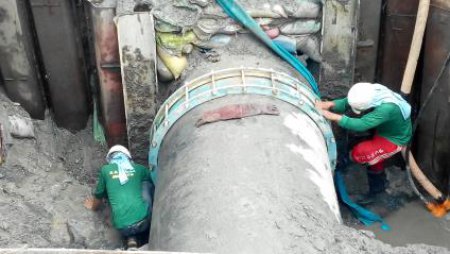
West Zone concessionaire Maynilad Water Services, Inc. (Maynilad) plugged over 22,300 pipe leaks as of the third quarter of this year, bringing the company’s total leak repairs to 302,000 since its re-privatization in 2007. Leak repair is a vital component of Maynilad’s Non-Revenue Water (NRW) Management Program, which seeks to bring down physical and commercial […]
Maynilad’s Lingkod Eskwela Program reaches 143K students in 2016
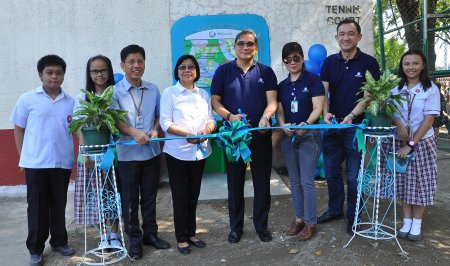
West Zone concessionaire Maynilad Water Services, Inc. (Maynilad) installed 52 drink-wash stations in 46 public schools this year through its Lingkod Eskwela Program, benefiting some 143,000 elementary, high school and college students. Lingkod Eskwela is Maynilad’s flagship corporate social responsibility (CSR) program that aims to promote good health through proper hygiene among students through the […]
Maynilad installs FAITH Garden in Moonwalk, Parañaque
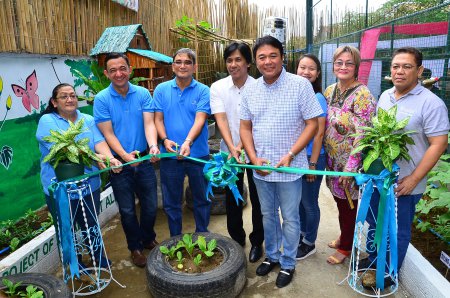
West Zone concessionaire Maynilad Water Services, Inc. (Maynilad) donated an overhead water tank and drip irrigation system to Barangay Moonwalk in Parañaque City—the sixth barangay to benefit from the city government’s home food security program “Food Always in the Home (FAITH) Gardens.” Maynilad has pledged to provide water tanks and drip irrigation systems for all […]
Maynilad awards top-performing vendors

West Zone concessionaire Maynilad Water Services, Inc. (Maynilad) recognized 12 vendors who met its strict performance standards during the company’s annual Top Achievement for Partners (TAP) Awards, held recently at Conrad Hotel Manila in Pasay City. The 12 awardees were judged based on the quality of their products and services, cost efficiency, timely delivery, responsiveness, […]
Maynilad inaugurates GinhaWASH at LRT-1

West Zone concessionaire Maynilad Water Services, Inc. (Maynilad) donated five drinking fountains for LRT Line 1 stations Roosevelt, Balintawak, Monumento, Carriedo, and Baclaran. The initiative is part of Maynilad’s GinhaWASH program, which aims to increase access to water, sanitation, and hygiene, as enshrined in the United Nations’ WASH (water, sanitation, and hygiene) agenda under […]
New Maynilad QC pumping station to serve 84k HHs

West Zone concessionaire Maynilad Water Services, Inc. (Maynilad) is building a supplementary pumping station inside La Mesa Compound in Quezon City to improve water pressure and expand coverage in Quezon City and Caloocan. � The ₱428-million North A Pumping Station Annex will serve more than 84,000 households in Barangays Greater Lagro and Pasong Putik in […]
Maynilad celebrates Global Handwashing Day 2016

West Zone concessionaire Maynilad Water Services, Inc. (Maynilad) taught some 2,000 school children proper handwashing in line with its week-long campaign to mark the Global Handwashing Day 2016.� The Global Handwashing Day (GHD) is an international advocacy dedicated to promote the value of proper handwashing with clean water and soap, which is a very effective […]
Maynilad, PAWD hold Watershed Conference 2016

Maynilad Water Services, Inc. (Maynilad)—through its education arm, Maynilad Water Academy—partnered with the Philippine Association of Water Districts (PAWD) to organize the Watershed Conference 2016, a venue for local water service providers to share best practices in watershed management. A total of 126 participants from various water districts and private companies nationwide gathered for the […]
Maynilad offers desludging service this October

This October, West Zone concessionaire Maynilad Water Services, Inc. (Maynilad) is offering septic tank cleaning services to its residential customers in select parts of Quezon City, Caloocan, Parañaque, Las Piñas, Muntinlupa, Valenzuela, and Cavite at no extra cost. Maynilad customers residing at Barangay Fairview in Quezon City; Brgys. 16-18, 20, 22, 25-28, 30-37, 44-46 […]
Maynilad clocks in 20M safe man hours

West Zone concessionaire Maynilad Water Services, Inc. (Maynilad) was recognized by the Safety Organization of the Philippines, Inc. (SOPI) for attaining an all-time high record of 20 Million Man Hour No Loss Time Accident (MHNLTA) in all of its facilities and offices. The outstanding safety achievement is a testimony to Maynilad’s uncompromising commitment to strict […]
