
Maynilad uses cookies to improve our website and enhance your browsing experience. Read our Cookie Notice.

Maynilad News

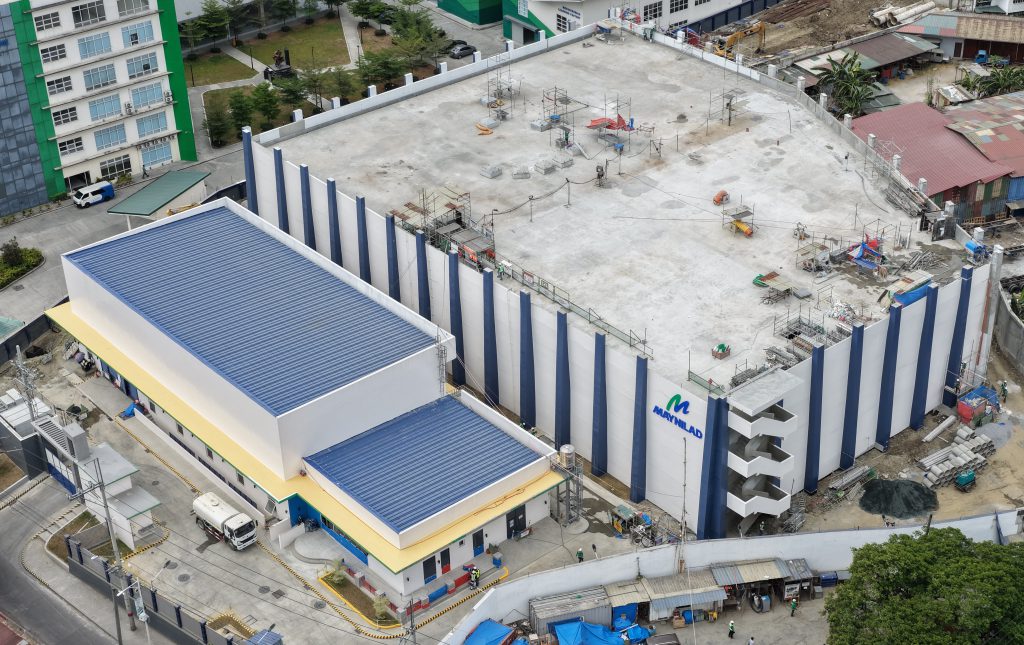
Maynilad’s ₱955-M Parada Pumping Station and Reservoir in Valenzuela nears completion

Share Via


West Zone concessionaire Maynilad Water Services, Inc. (Maynilad) is nearing completion of its ₱955-million Parada Pumping Station and Reservoir (PSR) in Valenzuela City, a major infrastructure investment aimed at strengthening water pressure and improving supply reliability in one of the concession area’s growing service zones.

Now more than 90% complete, the Parada PSR will add 40 million liters to Maynilad’s water storage capacity once operational, helping stabilize supply during peak demand periods and supporting long-term service expansion in northern Metro Manila.

Targeted for commissioning by the third quarter of the year, the facility will directly benefit around 50,000 residents of Barangay Parada. It is also expected to significantly improve water pressure in the area—from the current average of 7 pounds per square inch (psi) to 16 psi—sufficient to deliver water to the third floor of residential and commercial structures.

The Parada PSR forms part of Maynilad’s sustained capital expenditure program to modernize and expand its water infrastructure network. As of today, the company operates 41 pumping stations and 40 reservoirs strategically located across its West Zone concession area, up from only eight pumping stations and ten reservoirs in 2006 prior to its re-privatization.

“Investments in facilities such as the Parada PSR are critical to ensuring reliable and sustainable water service as demand continues to grow,” said Maynilad Chief Operating Officer Christopher Jaime T. Lichauco. “We are focused on completing this project on schedule so customers can experience tangible improvements in water pressure and service consistency.” Maynilad operates the largest water concession by population served within a single concession area in the Philippines. It is a concessionaire of the Metropolitan Waterworks and Sewerage System (MWSS) for the West Zone of the Greater Manila Area, which is composed of the cities of Manila (certain portions), Quezon City (certain portions), Makati (west of South Super Highway), Caloocan, Pasay, Parañaque, Las Piñas, Muntinlupa, Valenzuela, Navotas and Malabon, all in Metro Manila; the cities of Cavite, Bacoor and Imus, and the municipalities of Kawit, Noveleta and Rosario, all in Cavite Province.

PHOTO CAPTION: Maynilad’s Parada Pumping Station and Reservoir (PSR) in Valenzuela City is now more than 90% complete. Once operational, the ₱955-million facility will add 40 million liters to the company’s water storage capacity and improve water pressure for around 50,000 residents of Barangay Parada.

Maynilad uses cookies to improve our website and enhance your browsing experience. Read our Cookie Notice.

Bank of Commerce

ONLINE BANKING

Steps/Procedures Unavailable

MOBILE BANKING

Steps/Procedures Unavailable

BancNet

ONLINE BANKING

Steps/Procedures Unavailable

MOBILE BANKING

Steps/Procedures Unavailable

BDO

ONLINE BANKING

1.) Visit www.bdo.com.ph
2.) Click Online Banking Log in
3.) Click on Enroll Now
4.) Read the Terms and Conditions.
5.) Fill out the needed information
6.) Click Submit

MOBILE BANKING

1.) Download the BDO Personal Banking
2.) Click on Enroll Now
3.) Read the Terms and Conditions.
4.) Fill out the needed information
5.) Click Submit

BPI

ONLINE BANKING

1.) Go to BPI Expressonline (www.bpiexpressonline.com) then click on “Enroll Now”.
2.) Select your location from the options provided.
3.) Read the Terms and Conditions.
4.) Submit your deposit account information.
5.) Fill out the EOL REgistration Form.
6.) A confirmation page will appear.

MOBILE BANKING

1.) Download the BPI Mobile App
2.) Click on Log in
3.) Click on Register Now
4.) Read the Terms and Conditions.
5.) Fill out the needed information
6.) Click Submit

LandBank

ONLINE BANKING

1.) Visit www.lbpiaccess.com.ph
2.) Click on Enroll now
3.) Read the Terms and Conditions.
4.) Fill out the needed information
5.) Click Submit

MOBILE BANKING

1.) Download the Landbank Mobile App
2.) Enroll on lbpiAccess.com
3.) Use the log-in credentials to access the App

EastWest Bank

ONLINE BANKING

1.) Visit www.eastwestbanker.com
2.) Click Log in now and then Personal Account
3.) Click Sign me up
4.) Read the Terms and Conditions.
5.) Follow the steps and fill out the needed information
6.) Click Submit

MOBILE BANKING

1.) Download the Eastwest Mobile Banking App
2.) Click on Sign me up
3.) Read the Terms and Conditions.
4.) Fill out the needed information

MetroBank

ONLINE BANKING

1.) Visit personal.metrobankdirect.com
2.) Click on Sign up now
3.) Read the Terms and Conditions.
4.) Select the account that you would like to enroll
5.) Fill out the needed information
6.) Click Submit

MOBILE BANKING

1.) Download the Metrobank App
2.) Click on Sign up
3.) Read the Terms and Conditions.
4.) Fill out the needed information

Chinabank

ONLINE BANKING

Steps/Procedures Unavailable

MOBILE BANKING

1.) Download the CBS Personal App
2.) Click on Sign up
3.) Read the Terms and Conditions.
4.) Fill out the needed information

PSBank

ONLINE BANKING

1.) Visit www.psbank.com.ph
2.) Click Log in then Personal
3.) Click Register Account
4.) Read the Terms and Conditions.
5.) Fill out the needed information
6.) Click Submit

MOBILE BANKING

1.) Download the PSBANK Mobile App
2.) Click on Sign up Now
3.) Read the Terms and Conditions.
4.) Fill out the needed information

Security Bank

ONLINE BANKING

1.) Visit www.securitybank.com
2.) Click on Log in
3.) Click Enroll Now
4.) Read the Terms and Conditions.
5.) Choose the type of account to enroll
6.) Fill out the needed information
7.) Click Submit

MOBILE BANKING

Steps/Procedures Unavailable

UnionBank

ONLINE BANKING

1.) Visit www.unionbankph.com
2.) Click on UnionBank Online
3.) Click Sign Up Now
4.) Read the Terms and Conditions.
5.) Choose the type of account to enroll
6.) Fill out the needed information
7.) Click Submit

MOBILE BANKING

1.) Download the UnionBank App
2.) Click on Sign up with My Existing Account
3.) Read the Terms and Conditions.
4.) Choose the type of account to enroll
5.) Fill out the needed information

RCBC

ONLINE BANKING

1.) Visit www.rcbc.com
2.) Click on Log in Personal Online Banking
3.) Click Enroll Now
4.) Fill out the needed information
5.) Click Submit

MOBILE BANKING

1.) Download the RCBC App
2.) Click on Register
3.) Read the Terms and Conditions.
4.) Fill out the needed information

UCPB

ONLINE BANKING

1.) Visit www.ucpb.com
2.) Click on Connect Log in
3.) Click on New User
4.) Read the Terms and Conditions.
5.) Fill out the needed information
6.) Click Register

MOBILE BANKING

1.) Download the UCPB App
2.) Click on Enroll Now
3.) Read the Terms and Conditions.
4.) Fill out the needed information
5.) Click Register