
Maynilad uses cookies to improve our website and enhance your browsing experience. Read our Cookie Notice.

Maynilad News

Maynilad upgrades Putatan Water Treatment Plant 1 with ceramic UF technology

Share Via


West Zone concessionaire Maynilad Water Services, Inc. (Maynilad) is upgrading its Putatan Water Treatment Plant (PWTP) 1 in Muntinlupa City with ceramic ultrafiltration (UF) technology to strengthen the facility’s capability to treat raw water from Laguna Lake.

The project involves the phased replacement of existing ultrafiltration membranes at PWTP 1 with ceramic UF membranes—a state-of-the-art technology designed to support more stable treatment operations amid increasingly variable raw water conditions.

Maynilad first adopted ceramic UF technology in its 20-million-liter-per-day Laguna Lake Modular Treatment Plant, which was inaugurated in 2024. The facility treats raw water from Laguna Lake and augments the production of Maynilad’s existing treatment facilities in Muntinlupa. It also marked the first use of ceramic UF technology for water treatment in the Philippines.

The modular treatment plant helped validate the effectiveness of ceramic UF technology under Laguna Lake conditions, where raw water quality can fluctuate abruptly due to weather and climate-related factors. Ceramic UF membranes are also designed for durability and longer service life, which can support more sustainable treatment operations through improved reliability and reduced maintenance requirements. Its performance gave Maynilad the basis to pursue the phased adoption of ceramic UF technology at PWTP 1.

“Maynilad continues to invest in technologies that will help us meet evolving water supply and treatment challenges. With ceramic UF, we are building on a technology that we have already tested under Laguna Lake conditions, and are now scaling it up to further improve the reliability, resilience, and sustainability of our water treatment operations,” said Maynilad President and CEO Ramoncito S. Fernandez.

The first phase of the PWTP 1 upgrade will cover part of the plant’s existing ultrafiltration system and is targeted for progressive commissioning starting by the end of 2026. It forms part of Maynilad’s broader program to enhance the reliability of its Laguna Lake treatment facilities, which serve as alternative sources to Angat Dam and help support water security for customers in the West Zone. Once this phase is completed, the upgrade is expected to support more stable and reliable treatment operations, particularly during periods of elevated turbidity in Laguna Lake.

Maynilad is pursuing investments in advanced treatment technologies as part of its continuing efforts to improve supply reliability, diversify raw water sources, and strengthen climate resilience across its water production system.

Maynilad operates the largest water concession by population served within a single concession area in the Philippines. It is a concessionaire of the Metropolitan Waterworks and Sewerage System (MWSS) for the West Zone of the Greater Manila Area, which is composed of the cities of Manila (certain portions), Quezon City (certain portions), Makati (west of South Super Highway), Caloocan, Pasay, Parañaque, Las Piñas, Muntinlupa, Valenzuela, Navotas and Malabon all in Metro Manila; the cities of Cavite, Bacoor and Imus, and the municipalities of Kawit, Noveleta and Rosario, all in Cavite Province.

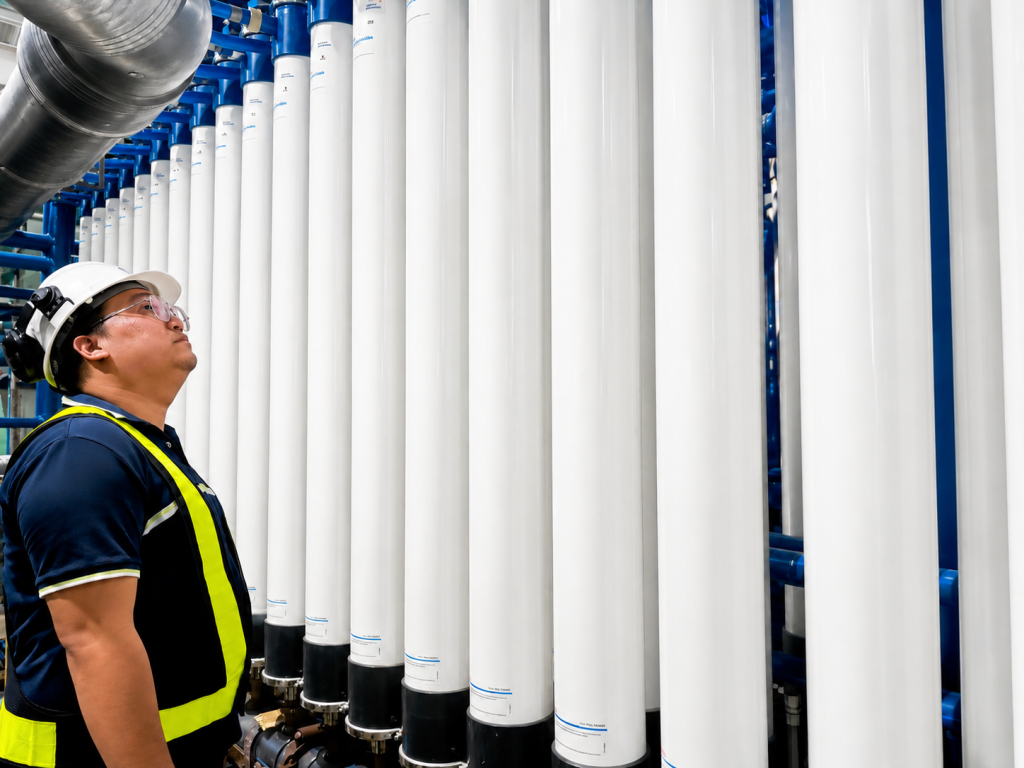
PHOTO CAPTION: A Maynilad engineer inspects the existing ultrafiltration assemblies at Putatan Water Treatment Plant 1 in Muntinlupa City. Maynilad is upgrading the facility with ceramic ultrafiltration technology to strengthen its capability to treat raw water from Laguna Lake.

Maynilad uses cookies to improve our website and enhance your browsing experience. Read our Cookie Notice.

Bank of Commerce

ONLINE BANKING

Steps/Procedures Unavailable

MOBILE BANKING

Steps/Procedures Unavailable

BancNet

ONLINE BANKING

Steps/Procedures Unavailable

MOBILE BANKING

Steps/Procedures Unavailable

BDO

ONLINE BANKING

1.) Visit www.bdo.com.ph
2.) Click Online Banking Log in
3.) Click on Enroll Now
4.) Read the Terms and Conditions.
5.) Fill out the needed information
6.) Click Submit

MOBILE BANKING

1.) Download the BDO Personal Banking
2.) Click on Enroll Now
3.) Read the Terms and Conditions.
4.) Fill out the needed information
5.) Click Submit

BPI

ONLINE BANKING

1.) Go to BPI Expressonline (www.bpiexpressonline.com) then click on “Enroll Now”.
2.) Select your location from the options provided.
3.) Read the Terms and Conditions.
4.) Submit your deposit account information.
5.) Fill out the EOL REgistration Form.
6.) A confirmation page will appear.

MOBILE BANKING

1.) Download the BPI Mobile App
2.) Click on Log in
3.) Click on Register Now
4.) Read the Terms and Conditions.
5.) Fill out the needed information
6.) Click Submit

LandBank

ONLINE BANKING

1.) Visit www.lbpiaccess.com.ph
2.) Click on Enroll now
3.) Read the Terms and Conditions.
4.) Fill out the needed information
5.) Click Submit

MOBILE BANKING

1.) Download the Landbank Mobile App
2.) Enroll on lbpiAccess.com
3.) Use the log-in credentials to access the App

EastWest Bank

ONLINE BANKING

1.) Visit www.eastwestbanker.com
2.) Click Log in now and then Personal Account
3.) Click Sign me up
4.) Read the Terms and Conditions.
5.) Follow the steps and fill out the needed information
6.) Click Submit

MOBILE BANKING

1.) Download the Eastwest Mobile Banking App
2.) Click on Sign me up
3.) Read the Terms and Conditions.
4.) Fill out the needed information

MetroBank

ONLINE BANKING

1.) Visit personal.metrobankdirect.com
2.) Click on Sign up now
3.) Read the Terms and Conditions.
4.) Select the account that you would like to enroll
5.) Fill out the needed information
6.) Click Submit

MOBILE BANKING

1.) Download the Metrobank App
2.) Click on Sign up
3.) Read the Terms and Conditions.
4.) Fill out the needed information

Chinabank

ONLINE BANKING

Steps/Procedures Unavailable

MOBILE BANKING

1.) Download the CBS Personal App
2.) Click on Sign up
3.) Read the Terms and Conditions.
4.) Fill out the needed information

PSBank

ONLINE BANKING

1.) Visit www.psbank.com.ph
2.) Click Log in then Personal
3.) Click Register Account
4.) Read the Terms and Conditions.
5.) Fill out the needed information
6.) Click Submit

MOBILE BANKING

1.) Download the PSBANK Mobile App
2.) Click on Sign up Now
3.) Read the Terms and Conditions.
4.) Fill out the needed information

Security Bank

ONLINE BANKING

1.) Visit www.securitybank.com
2.) Click on Log in
3.) Click Enroll Now
4.) Read the Terms and Conditions.
5.) Choose the type of account to enroll
6.) Fill out the needed information
7.) Click Submit

MOBILE BANKING

Steps/Procedures Unavailable

UnionBank

ONLINE BANKING

1.) Visit www.unionbankph.com
2.) Click on UnionBank Online
3.) Click Sign Up Now
4.) Read the Terms and Conditions.
5.) Choose the type of account to enroll
6.) Fill out the needed information
7.) Click Submit

MOBILE BANKING

1.) Download the UnionBank App
2.) Click on Sign up with My Existing Account
3.) Read the Terms and Conditions.
4.) Choose the type of account to enroll
5.) Fill out the needed information

RCBC

ONLINE BANKING

1.) Visit www.rcbc.com
2.) Click on Log in Personal Online Banking
3.) Click Enroll Now
4.) Fill out the needed information
5.) Click Submit

MOBILE BANKING

1.) Download the RCBC App
2.) Click on Register
3.) Read the Terms and Conditions.
4.) Fill out the needed information

UCPB

ONLINE BANKING

1.) Visit www.ucpb.com
2.) Click on Connect Log in
3.) Click on New User
4.) Read the Terms and Conditions.
5.) Fill out the needed information
6.) Click Register

MOBILE BANKING

1.) Download the UCPB App
2.) Click on Enroll Now
3.) Read the Terms and Conditions.
4.) Fill out the needed information
5.) Click Register