
Maynilad uses cookies to improve our website and enhance your browsing experience. Read our Cookie Notice.

Maynilad News

Maynilad sustains El Niño readiness after system withstands July Angat low

Share Via


West Zone concessionaire Maynilad Water Services, Inc. (Maynilad) continues to strengthen its El Niño preparedness even as Angat Dam has recovered from its July lows, citing reduced water losses as the primary contributor to lowering its operational reliance on Angat, complemented by source diversification, stronger treatment capability, and greater network flexibility.

Angat Dam fell to 150.42 meters in July 2026—lower than the 157.96-meter level recorded during the 2019 water crisis, when rotational water supply was implemented. This year, however, Maynilad was able to manage the lower dam level without resorting to rotational interruptions.

Angat has since recovered to above 207 meters following rains during the wet season, but Maynilad said continued preparedness remains necessary as El Niño conditions may bring below-normal rainfall and tighter raw water conditions in the coming months.

“The experience earlier this year showed why we have been investing in a more resilient water supply system,” said Maynilad Chief Operating Officer Christopher Jaime T. Lichauco. “When Angat dropped below its 2019 level, we had more tools available to manage the situation—from lower water losses and alternative sources to stronger treatment capability and greater network flexibility. We are continuing these measures as El Niño conditions persist and we prepare for potentially drier months ahead.”

The biggest contributor to reducing Maynilad’s operational reliance on Angat has been its intensified Non-Revenue Water (NRW) reduction program, which allows more of the water already available in the system to reach customers and reduces the need for additional raw water supply. As of June 2026, the company had reduced daily water losses by more than 150 million liters per day compared with June 2025, making more water available for distribution to customers.

Maynilad has also progressively diversified its water sources through Laguna Lake, deep wells, modular treatment plants, and NEW WATER facilities. Based on treatment capacity, Angat now accounts for about 83% of Maynilad’s supply capacity, compared with 100% historically.

The company has likewise strengthened its South system, particularly its Laguna Lake-based facilities, through treatment and process improvements designed to make alternative supply more reliable under changing raw water quality conditions. These investments provide added flexibility in managing available supply across the network when Angat becomes constrained.

Maynilad said it will continue to monitor source conditions, optimize available supply, and coordinate with government agencies on water allocation and supply management as El Niño conditions persist.

“Improved dam levels give us more buffer, but we continue to prepare because El Niño can still affect rainfall and raw water availability in the coming months,” Lichauco said. “Our objective is to keep strengthening the system so we can manage changing conditions while protecting service reliability for our customers.” Maynilad also encouraged customers to continue using water responsibly and to report visible leaks or illegal connections.

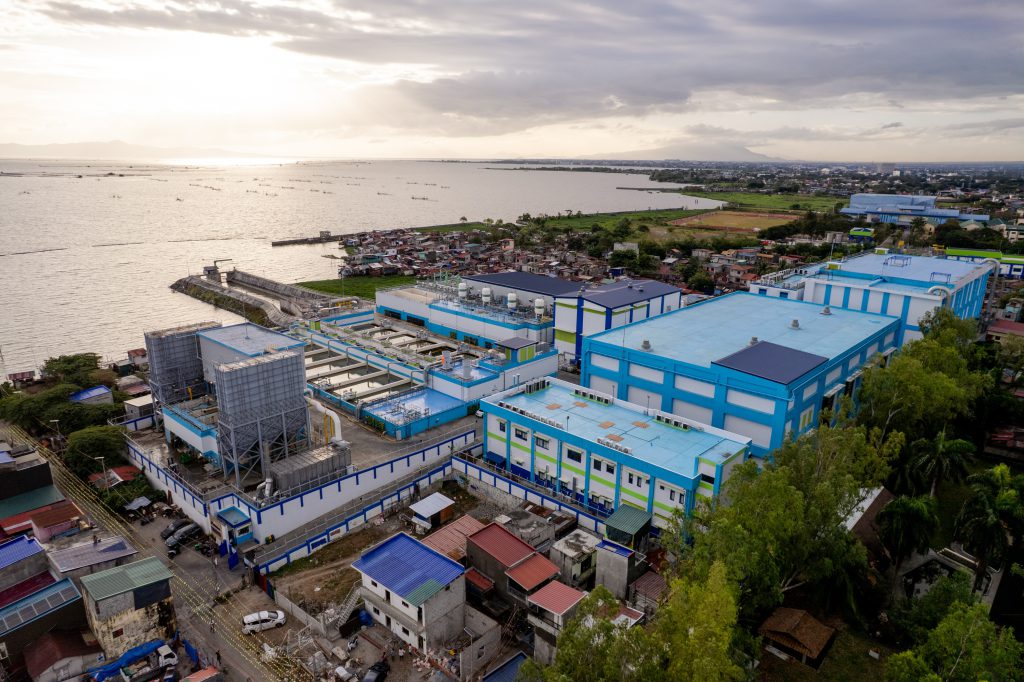
PHOTO CAPTION: Maynilad’s Poblacion Water Treatment Plant in Muntinlupa City draws raw water from Laguna Lake and forms part of the company’s strengthened South system, helping diversify water sources and reduce operational reliance on Angat Dam amid El Niño.

Maynilad uses cookies to improve our website and enhance your browsing experience. Read our Cookie Notice.

Bank of Commerce

ONLINE BANKING

Steps/Procedures Unavailable

MOBILE BANKING

Steps/Procedures Unavailable

BancNet

ONLINE BANKING

Steps/Procedures Unavailable

MOBILE BANKING

Steps/Procedures Unavailable

BDO

ONLINE BANKING

1.) Visit www.bdo.com.ph
2.) Click Online Banking Log in
3.) Click on Enroll Now
4.) Read the Terms and Conditions.
5.) Fill out the needed information
6.) Click Submit

MOBILE BANKING

1.) Download the BDO Personal Banking
2.) Click on Enroll Now
3.) Read the Terms and Conditions.
4.) Fill out the needed information
5.) Click Submit

BPI

ONLINE BANKING

1.) Go to BPI Expressonline (www.bpiexpressonline.com) then click on “Enroll Now”.
2.) Select your location from the options provided.
3.) Read the Terms and Conditions.
4.) Submit your deposit account information.
5.) Fill out the EOL REgistration Form.
6.) A confirmation page will appear.

MOBILE BANKING

1.) Download the BPI Mobile App
2.) Click on Log in
3.) Click on Register Now
4.) Read the Terms and Conditions.
5.) Fill out the needed information
6.) Click Submit

LandBank

ONLINE BANKING

1.) Visit www.lbpiaccess.com.ph
2.) Click on Enroll now
3.) Read the Terms and Conditions.
4.) Fill out the needed information
5.) Click Submit

MOBILE BANKING

1.) Download the Landbank Mobile App
2.) Enroll on lbpiAccess.com
3.) Use the log-in credentials to access the App

EastWest Bank

ONLINE BANKING

1.) Visit www.eastwestbanker.com
2.) Click Log in now and then Personal Account
3.) Click Sign me up
4.) Read the Terms and Conditions.
5.) Follow the steps and fill out the needed information
6.) Click Submit

MOBILE BANKING

1.) Download the Eastwest Mobile Banking App
2.) Click on Sign me up
3.) Read the Terms and Conditions.
4.) Fill out the needed information

MetroBank

ONLINE BANKING

1.) Visit personal.metrobankdirect.com
2.) Click on Sign up now
3.) Read the Terms and Conditions.
4.) Select the account that you would like to enroll
5.) Fill out the needed information
6.) Click Submit

MOBILE BANKING

1.) Download the Metrobank App
2.) Click on Sign up
3.) Read the Terms and Conditions.
4.) Fill out the needed information

Chinabank

ONLINE BANKING

Steps/Procedures Unavailable

MOBILE BANKING

1.) Download the CBS Personal App
2.) Click on Sign up
3.) Read the Terms and Conditions.
4.) Fill out the needed information

PSBank

ONLINE BANKING

1.) Visit www.psbank.com.ph
2.) Click Log in then Personal
3.) Click Register Account
4.) Read the Terms and Conditions.
5.) Fill out the needed information
6.) Click Submit

MOBILE BANKING

1.) Download the PSBANK Mobile App
2.) Click on Sign up Now
3.) Read the Terms and Conditions.
4.) Fill out the needed information

Security Bank

ONLINE BANKING

1.) Visit www.securitybank.com
2.) Click on Log in
3.) Click Enroll Now
4.) Read the Terms and Conditions.
5.) Choose the type of account to enroll
6.) Fill out the needed information
7.) Click Submit

MOBILE BANKING

Steps/Procedures Unavailable

UnionBank

ONLINE BANKING

1.) Visit www.unionbankph.com
2.) Click on UnionBank Online
3.) Click Sign Up Now
4.) Read the Terms and Conditions.
5.) Choose the type of account to enroll
6.) Fill out the needed information
7.) Click Submit

MOBILE BANKING

1.) Download the UnionBank App
2.) Click on Sign up with My Existing Account
3.) Read the Terms and Conditions.
4.) Choose the type of account to enroll
5.) Fill out the needed information

RCBC

ONLINE BANKING

1.) Visit www.rcbc.com
2.) Click on Log in Personal Online Banking
3.) Click Enroll Now
4.) Fill out the needed information
5.) Click Submit

MOBILE BANKING

1.) Download the RCBC App
2.) Click on Register
3.) Read the Terms and Conditions.
4.) Fill out the needed information

UCPB

ONLINE BANKING

1.) Visit www.ucpb.com
2.) Click on Connect Log in
3.) Click on New User
4.) Read the Terms and Conditions.
5.) Fill out the needed information
6.) Click Register

MOBILE BANKING

1.) Download the UCPB App
2.) Click on Enroll Now
3.) Read the Terms and Conditions.
4.) Fill out the needed information
5.) Click Register