
Maynilad uses cookies to improve our website and enhance your browsing experience. Read our Cookie Notice.

Maynilad News

Maynilad secures nine ISO certifications across key facilities

Share Via
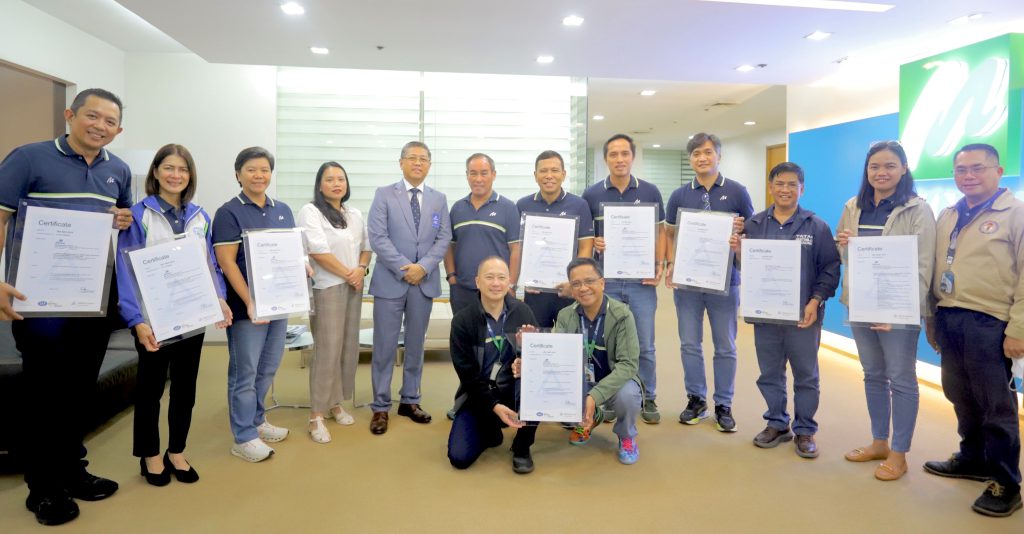
Maynilad Chief Operating Officer Christopher Lichauco (6th from left) formally accepts nine new ISO certifications from Tristan Arwen G. Loveres, Managing Director of TUV Rheinland Philippines, Inc. (5th from left), recognizing three Maynilad facilities for their compliance with international standards in quality, environmental, and occupational health and safety management systems. They were joined by members of the Maynilad leadership team, including (from left) Project Management Division Head Engr. Apollo Tiglao, Corporate Affairs and Communication Head Marie Antonette De Ocampo, Supply Chain Management Head Cybele Regalado, Water Supply Operations Head Engr. Ronaldo Padua, Wastewater Management Division Head Engr. Zmel Grabillo, Non-Revenue Water Division Head Engr. Ryan Jamora, Quality, Sustainability and Resiliency Head Atty. Roel Espiritu, Technical Resources Management Head Engr. Ma. Cherry Marilla, and Enterprise Risk Management and Internal Audit Head Jose Rizal Batiles. Seated in front (from left) are Human Resources Head Martin De Guzman and Customer Experience and Retail Operations Head Engr. Rodolfo Baylas.

West Zone concessionaire Maynilad Water Services, Inc. (Maynilad) has earned nine ISO certifications from international certifying body TÜV Rheinland, underscoring the company’s continued commitment to quality, environmental stewardship, and workplace safety across its operations.

The certifications cover three major facilities—Putatan Water Treatment Plant 2 in Muntinlupa, Parañaque NEW WATER Treatment Plant, and the Novaliches Pumping Station and Reservoir—which were assessed and found compliant with international standards for Quality Management Systems (ISO 9001:2015), Environmental Management Systems (ISO 14001:2015), and Occupational Health and Safety Management Systems (ISO 45001:2018). 

“These certifications speak to the kind of work our teams do every day. They follow global standards not just for compliance, but because they know it keeps our operations reliable and our communities safe,” said Atty. Roel S. Espiritu, Maynilad’s Chief Sustainability Officer and Head of Quality, Sustainability and Resiliency Division.

With these latest recognitions, Putatan Water Treatment Plant 2 now holds five ISO certifications, having previously earned ISO 50001:2018 (Energy Management System) and ISO 22301:2019 (Business Continuity Management System). The Parañaque NEW WATER Treatment Plant, which produces high-quality potable water through advanced wastewater recycling technology, obtained its first set of ISO certifications, while the Novaliches Pump Station and Reservoir received its initial accreditations under Maynilad’s Integrated Management System (IMS) program.

Maynilad now maintains a total of 292 ISO certifications under its partnership with TÜV Rheinland—one of the largest certification portfolios in the Philippine water industry—affirming the company’s sustained adherence to globally recognized operational, environmental, and safety standards.

Maynilad is the largest private water concessionaire in the Philippines in terms of customer base. It is the concessionaire of the Metropolitan Waterworks and Sewerage System (MWSS) for the West Zone of the Greater Manila Area, which is composed of the cities of Manila (certain portions), Quezon City (certain portions), Makati (west of South Super Highway), Caloocan, Pasay, Parañaque, Las Piñas, Muntinlupa, Valenzuela, Navotas and Malabon all in Metro Manila; the cities of Cavite, Bacoor and Imus, and the municipalities of Kawit, Noveleta and Rosario, all in Cavite Province.

Maynilad uses cookies to improve our website and enhance your browsing experience. Read our Cookie Notice.

Bank of Commerce

ONLINE BANKING

Steps/Procedures Unavailable

MOBILE BANKING

Steps/Procedures Unavailable

BancNet

ONLINE BANKING

Steps/Procedures Unavailable

MOBILE BANKING

Steps/Procedures Unavailable

BDO

ONLINE BANKING

1.) Visit www.bdo.com.ph
2.) Click Online Banking Log in
3.) Click on Enroll Now
4.) Read the Terms and Conditions.
5.) Fill out the needed information
6.) Click Submit

MOBILE BANKING

1.) Download the BDO Personal Banking
2.) Click on Enroll Now
3.) Read the Terms and Conditions.
4.) Fill out the needed information
5.) Click Submit

BPI

ONLINE BANKING

1.) Go to BPI Expressonline (www.bpiexpressonline.com) then click on “Enroll Now”.
2.) Select your location from the options provided.
3.) Read the Terms and Conditions.
4.) Submit your deposit account information.
5.) Fill out the EOL REgistration Form.
6.) A confirmation page will appear.

MOBILE BANKING

1.) Download the BPI Mobile App
2.) Click on Log in
3.) Click on Register Now
4.) Read the Terms and Conditions.
5.) Fill out the needed information
6.) Click Submit

LandBank

ONLINE BANKING

1.) Visit www.lbpiaccess.com.ph
2.) Click on Enroll now
3.) Read the Terms and Conditions.
4.) Fill out the needed information
5.) Click Submit

MOBILE BANKING

1.) Download the Landbank Mobile App
2.) Enroll on lbpiAccess.com
3.) Use the log-in credentials to access the App

EastWest Bank

ONLINE BANKING

1.) Visit www.eastwestbanker.com
2.) Click Log in now and then Personal Account
3.) Click Sign me up
4.) Read the Terms and Conditions.
5.) Follow the steps and fill out the needed information
6.) Click Submit

MOBILE BANKING

1.) Download the Eastwest Mobile Banking App
2.) Click on Sign me up
3.) Read the Terms and Conditions.
4.) Fill out the needed information

MetroBank

ONLINE BANKING

1.) Visit personal.metrobankdirect.com
2.) Click on Sign up now
3.) Read the Terms and Conditions.
4.) Select the account that you would like to enroll
5.) Fill out the needed information
6.) Click Submit

MOBILE BANKING

1.) Download the Metrobank App
2.) Click on Sign up
3.) Read the Terms and Conditions.
4.) Fill out the needed information

Chinabank

ONLINE BANKING

Steps/Procedures Unavailable

MOBILE BANKING

1.) Download the CBS Personal App
2.) Click on Sign up
3.) Read the Terms and Conditions.
4.) Fill out the needed information

PSBank

ONLINE BANKING

1.) Visit www.psbank.com.ph
2.) Click Log in then Personal
3.) Click Register Account
4.) Read the Terms and Conditions.
5.) Fill out the needed information
6.) Click Submit

MOBILE BANKING

1.) Download the PSBANK Mobile App
2.) Click on Sign up Now
3.) Read the Terms and Conditions.
4.) Fill out the needed information

Security Bank

ONLINE BANKING

1.) Visit www.securitybank.com
2.) Click on Log in
3.) Click Enroll Now
4.) Read the Terms and Conditions.
5.) Choose the type of account to enroll
6.) Fill out the needed information
7.) Click Submit

MOBILE BANKING

Steps/Procedures Unavailable

UnionBank

ONLINE BANKING

1.) Visit www.unionbankph.com
2.) Click on UnionBank Online
3.) Click Sign Up Now
4.) Read the Terms and Conditions.
5.) Choose the type of account to enroll
6.) Fill out the needed information
7.) Click Submit

MOBILE BANKING

1.) Download the UnionBank App
2.) Click on Sign up with My Existing Account
3.) Read the Terms and Conditions.
4.) Choose the type of account to enroll
5.) Fill out the needed information

RCBC

ONLINE BANKING

1.) Visit www.rcbc.com
2.) Click on Log in Personal Online Banking
3.) Click Enroll Now
4.) Fill out the needed information
5.) Click Submit

MOBILE BANKING

1.) Download the RCBC App
2.) Click on Register
3.) Read the Terms and Conditions.
4.) Fill out the needed information

UCPB

ONLINE BANKING

1.) Visit www.ucpb.com
2.) Click on Connect Log in
3.) Click on New User
4.) Read the Terms and Conditions.
5.) Fill out the needed information
6.) Click Register

MOBILE BANKING

1.) Download the UCPB App
2.) Click on Enroll Now
3.) Read the Terms and Conditions.
4.) Fill out the needed information
5.) Click Register