
Maynilad uses cookies to improve our website and enhance your browsing experience. Read our Cookie Notice.

Maynilad News

Maynilad recovers 7.71 MLD of water in Caloocan through pipe upgrades

Share Via


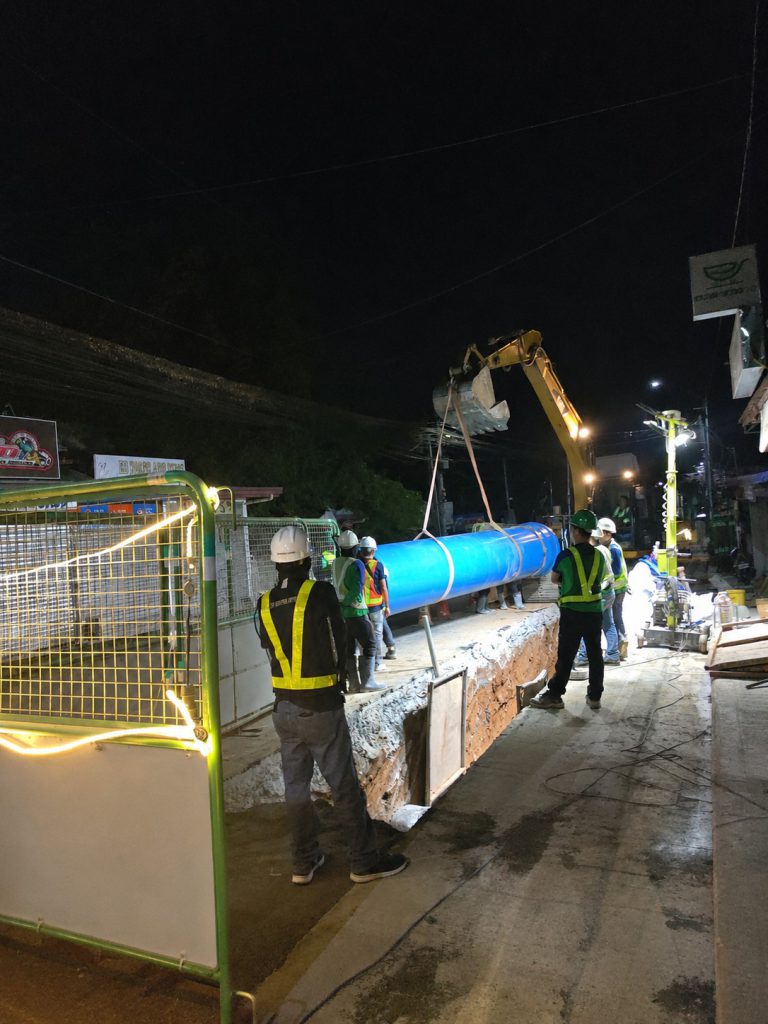
West Zone concessionaire Maynilad Water Services, Inc. (Maynilad) has recovered 7.71 million liters per day (MLD) of water in Caloocan City following the completion of seven major pipe replacement projects implemented in 2025.

The Php889-million infrastructure investment involved the replacement of 37.7 kilometers of aging and leak-prone pipelines along key roads including Amparo, Quisimbing, Camarin Road, Gen. San Miguel, Zapote, Quirino Highway, and T. Bugallon.

With the upgraded pipelines now in operation, over 165,000 residents in Barangays 165, 178, 179, and 188, as well as Barangays 1, 4–9, 13, 15, 17, 19, and 21, are benefiting from improved water pressure and a more reliable water supply through the additional water recovered from the upgraded network.

The newly installed pipelines range from 75 millimeters to 300 millimeters in diameter in the secondary distribution system and up to 600 millimeters in diameter in the primary distribution system, helping strengthen the integrity and efficiency of the Caloocan water distribution network.

The projects form part of Maynilad’s continuing Non-Revenue Water (NRW) Management Program, which aims to reduce system losses and maximize available water supply. The program includes the establishment of District Metered Areas (DMAs), advanced network diagnostics, active leak detection and repair, large-scale pipe replacement initiatives, and strict meter management.

“Pipe replacement is a critical part of our water loss reduction strategy because it allows us to recover more water from within the existing distribution system. These investments help improve service reliability for our customers while maximizing the use of available water supply,” said Maynilad President Ramoncito S. Fernandez.

Maynilad continues to implement strategic infrastructure upgrades across its concession area to strengthen system resilience, reduce water losses, and ensure reliable water service for the communities it serves.

Maynilad operates the largest water concession by population served within a single concession area in the Philippines. It is a concessionaire of the Metropolitan Waterworks and Sewerage System (MWSS) for the West Zone of the Greater Manila Area, which is composed of the cities of Manila (certain portions), Quezon City (certain portions), Makati (west of South Super Highway), Caloocan, Pasay, Parañaque, Las Piñas, Muntinlupa, Valenzuela, Navotas and Malabon, all in Metro Manila; the cities of Cavite, Bacoor and Imus, and the municipalities of Kawit, Noveleta and Rosario, all in Cavite Province.

PHOTO CAPTION: Photo shows Maynilad personnel installing new pipelines in Caloocan City as part of the company’s pipe replacement program. The completed upgrades helped recover 7.71 million liters per day of water and improve service reliability for customers in the area.

Maynilad uses cookies to improve our website and enhance your browsing experience. Read our Cookie Notice.

Bank of Commerce

ONLINE BANKING

Steps/Procedures Unavailable

MOBILE BANKING

Steps/Procedures Unavailable

BancNet

ONLINE BANKING

Steps/Procedures Unavailable

MOBILE BANKING

Steps/Procedures Unavailable

BDO

ONLINE BANKING

1.) Visit www.bdo.com.ph
2.) Click Online Banking Log in
3.) Click on Enroll Now
4.) Read the Terms and Conditions.
5.) Fill out the needed information
6.) Click Submit

MOBILE BANKING

1.) Download the BDO Personal Banking
2.) Click on Enroll Now
3.) Read the Terms and Conditions.
4.) Fill out the needed information
5.) Click Submit

BPI

ONLINE BANKING

1.) Go to BPI Expressonline (www.bpiexpressonline.com) then click on “Enroll Now”.
2.) Select your location from the options provided.
3.) Read the Terms and Conditions.
4.) Submit your deposit account information.
5.) Fill out the EOL REgistration Form.
6.) A confirmation page will appear.

MOBILE BANKING

1.) Download the BPI Mobile App
2.) Click on Log in
3.) Click on Register Now
4.) Read the Terms and Conditions.
5.) Fill out the needed information
6.) Click Submit

LandBank

ONLINE BANKING

1.) Visit www.lbpiaccess.com.ph
2.) Click on Enroll now
3.) Read the Terms and Conditions.
4.) Fill out the needed information
5.) Click Submit

MOBILE BANKING

1.) Download the Landbank Mobile App
2.) Enroll on lbpiAccess.com
3.) Use the log-in credentials to access the App

EastWest Bank

ONLINE BANKING

1.) Visit www.eastwestbanker.com
2.) Click Log in now and then Personal Account
3.) Click Sign me up
4.) Read the Terms and Conditions.
5.) Follow the steps and fill out the needed information
6.) Click Submit

MOBILE BANKING

1.) Download the Eastwest Mobile Banking App
2.) Click on Sign me up
3.) Read the Terms and Conditions.
4.) Fill out the needed information

MetroBank

ONLINE BANKING

1.) Visit personal.metrobankdirect.com
2.) Click on Sign up now
3.) Read the Terms and Conditions.
4.) Select the account that you would like to enroll
5.) Fill out the needed information
6.) Click Submit

MOBILE BANKING

1.) Download the Metrobank App
2.) Click on Sign up
3.) Read the Terms and Conditions.
4.) Fill out the needed information

Chinabank

ONLINE BANKING

Steps/Procedures Unavailable

MOBILE BANKING

1.) Download the CBS Personal App
2.) Click on Sign up
3.) Read the Terms and Conditions.
4.) Fill out the needed information

PSBank

ONLINE BANKING

1.) Visit www.psbank.com.ph
2.) Click Log in then Personal
3.) Click Register Account
4.) Read the Terms and Conditions.
5.) Fill out the needed information
6.) Click Submit

MOBILE BANKING

1.) Download the PSBANK Mobile App
2.) Click on Sign up Now
3.) Read the Terms and Conditions.
4.) Fill out the needed information

Security Bank

ONLINE BANKING

1.) Visit www.securitybank.com
2.) Click on Log in
3.) Click Enroll Now
4.) Read the Terms and Conditions.
5.) Choose the type of account to enroll
6.) Fill out the needed information
7.) Click Submit

MOBILE BANKING

Steps/Procedures Unavailable

UnionBank

ONLINE BANKING

1.) Visit www.unionbankph.com
2.) Click on UnionBank Online
3.) Click Sign Up Now
4.) Read the Terms and Conditions.
5.) Choose the type of account to enroll
6.) Fill out the needed information
7.) Click Submit

MOBILE BANKING

1.) Download the UnionBank App
2.) Click on Sign up with My Existing Account
3.) Read the Terms and Conditions.
4.) Choose the type of account to enroll
5.) Fill out the needed information

RCBC

ONLINE BANKING

1.) Visit www.rcbc.com
2.) Click on Log in Personal Online Banking
3.) Click Enroll Now
4.) Fill out the needed information
5.) Click Submit

MOBILE BANKING

1.) Download the RCBC App
2.) Click on Register
3.) Read the Terms and Conditions.
4.) Fill out the needed information

UCPB

ONLINE BANKING

1.) Visit www.ucpb.com
2.) Click on Connect Log in
3.) Click on New User
4.) Read the Terms and Conditions.
5.) Fill out the needed information
6.) Click Register

MOBILE BANKING

1.) Download the UCPB App
2.) Click on Enroll Now
3.) Read the Terms and Conditions.
4.) Fill out the needed information
5.) Click Register