
Maynilad uses cookies to improve our website and enhance your browsing experience. Read our Cookie Notice.

Maynilad News

Maynilad IPO recognized at Alpha Southeast Asia 19th Annual Deal & Solution Awards

Share Via
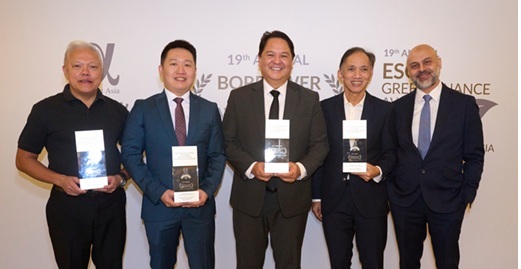
Maynilad Chief Finance Officer Ricardo F. Delos Reyes (center) receives the “Best IPO for Retail Investors in Asia 2025” and “Best Equity/IPO Deal of the Year in the Philippines 2025” citations at the Alpha Southeast Asia 19th Annual Deal & Solution Awards held in Singapore. Also in photo are (from left) Gerald K. Abrogar, EastWest Head – Investment Banking; Lester Ong, President of BPI Capital Corporation; Eduardo V. Francisco, President of BDO Capital and Investment Corporation; and Siddiq Bazarwala, CEO and Publisher of Alpha Southeast Asia.

The Php34.3-billion initial public offering (IPO) of West Zone concessionaire Maynilad Water Services, Inc. (Maynilad) was recognized at the Alpha Southeast Asia 19th Annual Deal & Solution Awards, receiving the “Best IPO for Retail Investors in Asia 2025” and “Best Equity/IPO Deal of the Year in the Philippines 2025” citations.

The awards were conferred during a ceremony held at The Fullerton Hotel Singapore. The recognition highlights the strong retail participation and overall market execution of Maynilad’s IPO—one of the Philippines’ landmark equity offerings.

Maynilad’s IPO marked the company’s listing on the Philippine Stock Exchange and formed part of its broader capital strategy to support ongoing investments in water infrastructure, wastewater expansion, and system loss reduction across its West Zone concession area.

“We are grateful for the recognition of our IPO, which reflects the confidence of both retail and institutional investors in Maynilad’s long-term growth strategy,” said Maynilad Chief Finance Officer Ricardo F. De Los Reyes. “The proceeds of the offering continue to support critical infrastructure projects that strengthen water security and service reliability for our customers.”

The Alpha Southeast Asia Deal & Solution Awards, organized by institutional investment magazine Alpha Southeast Asia, recognize excellence in capital markets transactions and financial solutions across the region.

Maynilad’s IPO was led by BPI Capital Corporation, HSBC, Morgan Stanley Asia (Singapore), and UBS AG (Singapore) as Joint Global Coordinators and Joint Bookrunners.

Maynilad uses cookies to improve our website and enhance your browsing experience. Read our Cookie Notice.

Bank of Commerce

ONLINE BANKING

Steps/Procedures Unavailable

MOBILE BANKING

Steps/Procedures Unavailable

BancNet

ONLINE BANKING

Steps/Procedures Unavailable

MOBILE BANKING

Steps/Procedures Unavailable

BDO

ONLINE BANKING

1.) Visit www.bdo.com.ph
2.) Click Online Banking Log in
3.) Click on Enroll Now
4.) Read the Terms and Conditions.
5.) Fill out the needed information
6.) Click Submit

MOBILE BANKING

1.) Download the BDO Personal Banking
2.) Click on Enroll Now
3.) Read the Terms and Conditions.
4.) Fill out the needed information
5.) Click Submit

BPI

ONLINE BANKING

1.) Go to BPI Expressonline (www.bpiexpressonline.com) then click on “Enroll Now”.
2.) Select your location from the options provided.
3.) Read the Terms and Conditions.
4.) Submit your deposit account information.
5.) Fill out the EOL REgistration Form.
6.) A confirmation page will appear.

MOBILE BANKING

1.) Download the BPI Mobile App
2.) Click on Log in
3.) Click on Register Now
4.) Read the Terms and Conditions.
5.) Fill out the needed information
6.) Click Submit

LandBank

ONLINE BANKING

1.) Visit www.lbpiaccess.com.ph
2.) Click on Enroll now
3.) Read the Terms and Conditions.
4.) Fill out the needed information
5.) Click Submit

MOBILE BANKING

1.) Download the Landbank Mobile App
2.) Enroll on lbpiAccess.com
3.) Use the log-in credentials to access the App

EastWest Bank

ONLINE BANKING

1.) Visit www.eastwestbanker.com
2.) Click Log in now and then Personal Account
3.) Click Sign me up
4.) Read the Terms and Conditions.
5.) Follow the steps and fill out the needed information
6.) Click Submit

MOBILE BANKING

1.) Download the Eastwest Mobile Banking App
2.) Click on Sign me up
3.) Read the Terms and Conditions.
4.) Fill out the needed information

MetroBank

ONLINE BANKING

1.) Visit personal.metrobankdirect.com
2.) Click on Sign up now
3.) Read the Terms and Conditions.
4.) Select the account that you would like to enroll
5.) Fill out the needed information
6.) Click Submit

MOBILE BANKING

1.) Download the Metrobank App
2.) Click on Sign up
3.) Read the Terms and Conditions.
4.) Fill out the needed information

Chinabank

ONLINE BANKING

Steps/Procedures Unavailable

MOBILE BANKING

1.) Download the CBS Personal App
2.) Click on Sign up
3.) Read the Terms and Conditions.
4.) Fill out the needed information

PSBank

ONLINE BANKING

1.) Visit www.psbank.com.ph
2.) Click Log in then Personal
3.) Click Register Account
4.) Read the Terms and Conditions.
5.) Fill out the needed information
6.) Click Submit

MOBILE BANKING

1.) Download the PSBANK Mobile App
2.) Click on Sign up Now
3.) Read the Terms and Conditions.
4.) Fill out the needed information

Security Bank

ONLINE BANKING

1.) Visit www.securitybank.com
2.) Click on Log in
3.) Click Enroll Now
4.) Read the Terms and Conditions.
5.) Choose the type of account to enroll
6.) Fill out the needed information
7.) Click Submit

MOBILE BANKING

Steps/Procedures Unavailable

UnionBank

ONLINE BANKING

1.) Visit www.unionbankph.com
2.) Click on UnionBank Online
3.) Click Sign Up Now
4.) Read the Terms and Conditions.
5.) Choose the type of account to enroll
6.) Fill out the needed information
7.) Click Submit

MOBILE BANKING

1.) Download the UnionBank App
2.) Click on Sign up with My Existing Account
3.) Read the Terms and Conditions.
4.) Choose the type of account to enroll
5.) Fill out the needed information

RCBC

ONLINE BANKING

1.) Visit www.rcbc.com
2.) Click on Log in Personal Online Banking
3.) Click Enroll Now
4.) Fill out the needed information
5.) Click Submit

MOBILE BANKING

1.) Download the RCBC App
2.) Click on Register
3.) Read the Terms and Conditions.
4.) Fill out the needed information

UCPB

ONLINE BANKING

1.) Visit www.ucpb.com
2.) Click on Connect Log in
3.) Click on New User
4.) Read the Terms and Conditions.
5.) Fill out the needed information
6.) Click Register

MOBILE BANKING

1.) Download the UCPB App
2.) Click on Enroll Now
3.) Read the Terms and Conditions.
4.) Fill out the needed information
5.) Click Register