
Maynilad uses cookies to improve our website and enhance your browsing experience. Read our Cookie Notice.

Maynilad News

Maynilad inaugurates 25th Water Reclamation Facility in Muntinlupa, expands wastewater service in the south

Share Via
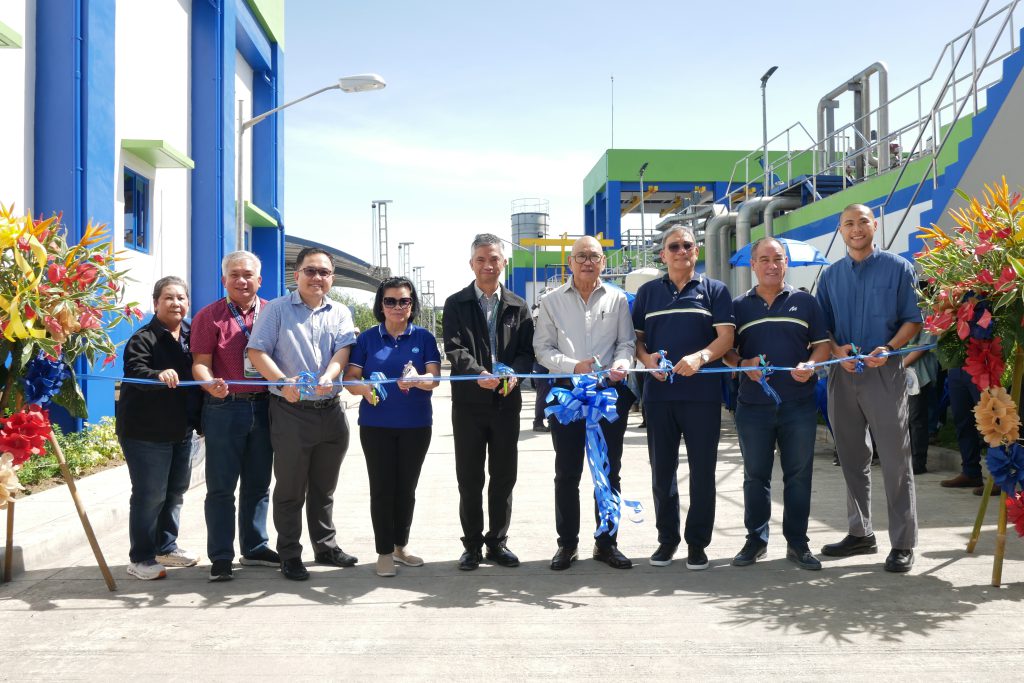
Officials from Maynilad and government agencies lead the ribbon-cutting ceremony for the newly inaugurated Tunasan Water Reclamation Facility (WRF) in Muntinlupa City. From left: Lorna B. Misa, OIC Head of ESC, EPNRO and LMO; Florencio G. Diwa Jr., OIC Director, DENR NCR MEO South; Atty. Patrick Lester N. Ty, Chief Regulator, MWSS RO; Engr.Leonor C. Cleofas, Vice-Chairman and Administrator, MWSS; Engr. Henry P. Pacis, Assistant Regional Executive Director, DENR-NCR; Elpidio J. Vega, Chairman, MWSS Board of Trustees; Ramoncito S. Fernandez, President and CEO of Maynilad; Christopher Jaime T. Lichauco, Chief Operating Officer of Maynilad; and Junn-Yeu C. Lock, Technical Assistant to the President, DMCI. The 20-MLD Tunasan WRF, Maynilad’s 25th wastewater treatment facility, expands sewerage service in the south and helps protect Laguna de Bay by treating used water from the Tunasan catchment area in compliance with DENR DAO 2016-08 and DAO 2021-19.
NOT FOR PUBLIC RELEASE, PUBLICATION OR DISTRIBUTION, OUTSIDE THE PHILIPPINES, INCLUDING DIRECTLY OR INDIRECTLY, IN OR INTO THE UNITED STATES OR ANY JURISDICTION WHERE TO DO SO WOULD CONSTITUTE A VIOLATION OF THE RELEVANT LAWS OF SUCH JURISDICTION
[These materials do not / This announcement does not] constitute or form a part of any offer or solicitation to purchase or subscribe for securities in the United States or in any other jurisdiction where it is unlawful to do so. The securities to which [these materials relate / this announcement relates] may not be offered or sold in the United States absent registration or an exemption from registration under the U.S. Securities Act of 1993, as amended. Neither the Company nor any seller of the securities intends to register any portion of the offering in the United States or to conduct a public offering of securities in the United States. No money, securities or other consideration is being solicited by this communication or the information contained herein and, if sent in response to this communication or the information contained herein, will not be accepted.

West Zone concessionaire Maynilad Water Services, Inc. (Maynilad) has inaugurated the new Tunasan Water Reclamation Facility (WRF) in Muntinlupa City—its 25th wastewater treatment facility—expanding sewerage coverage in the south and supporting long-term efforts to protect Laguna de Bay.

Located along Buendia Street in Barangay Tunasan, the new WRF can treat up to 20 million liters of used water per day (MLD). Wastewater from Magdaong, Bubogan, and Tunasan Creeks is conveyed through 1.4 kilometers of sewer pipes into the facility, serving around 83,000 customers within the Tunasan catchment area.

The Tunasan WRF uses the Modified Ludzack–Ettinger (MLE) process—a modern biological treatment technology—to reduce pollutants before discharge. The facility complies with stricter effluent quality requirements under Department of Environment and Natural Resources (DENR) DAO 2016-08, as amended by DAO 2021-19, helping protect Laguna de Bay and the surrounding environment.

“Every wastewater facility we build is more than infrastructure—it is a commitment to public health, a step toward cleaner waterways, and an investment in a future where communities can thrive alongside a healthy environment,” said Maynilad President and CEO Ramoncito S. Fernandez. “By expanding sewerage coverage here in Muntinlupa and investing in modern treatment technologies, we help safeguard Laguna de Bay and strengthen responsible wastewater management in the West Zone.”

The project was implemented in coordination with the Metropolitan Waterworks and Sewerage System (MWSS), the DENR, the Laguna Lake Development Authority (LLDA), and the Muntinlupa City Government. Treated wastewater from the Tunasan WRF is discharged into Bubogan Creek.

With the addition of Tunasan WRF, Maynilad now has a total wastewater treatment capacity of 790 MLD, supporting the company’s broader program to accelerate sewerage and sanitation services in Metro Manila and contribute to the rehabilitation of Laguna de Bay.

Maynilad is the largest private water concessionaire in the Philippines in terms of customer base. It is the concessionaire of the Metropolitan Waterworks and Sewerage System (MWSS) for the West Zone of the Greater Manila Area, which is composed of the cities of Manila (certain portions), Quezon City (certain portions), Makati (west of South Super Highway), Caloocan, Pasay, Parañaque, Las Piñas, Muntinlupa, Valenzuela, Navotas and Malabon all in Metro Manila; the cities of Cavite, Bacoor and Imus, and the municipalities of Kawit, Noveleta and Rosario, all in Cavite Province.

Maynilad uses cookies to improve our website and enhance your browsing experience. Read our Cookie Notice.

Bank of Commerce

ONLINE BANKING

Steps/Procedures Unavailable

MOBILE BANKING

Steps/Procedures Unavailable

BancNet

ONLINE BANKING

Steps/Procedures Unavailable

MOBILE BANKING

Steps/Procedures Unavailable

BDO

ONLINE BANKING

1.) Visit www.bdo.com.ph
2.) Click Online Banking Log in
3.) Click on Enroll Now
4.) Read the Terms and Conditions.
5.) Fill out the needed information
6.) Click Submit

MOBILE BANKING

1.) Download the BDO Personal Banking
2.) Click on Enroll Now
3.) Read the Terms and Conditions.
4.) Fill out the needed information
5.) Click Submit

BPI

ONLINE BANKING

1.) Go to BPI Expressonline (www.bpiexpressonline.com) then click on “Enroll Now”.
2.) Select your location from the options provided.
3.) Read the Terms and Conditions.
4.) Submit your deposit account information.
5.) Fill out the EOL REgistration Form.
6.) A confirmation page will appear.

MOBILE BANKING

1.) Download the BPI Mobile App
2.) Click on Log in
3.) Click on Register Now
4.) Read the Terms and Conditions.
5.) Fill out the needed information
6.) Click Submit

LandBank

ONLINE BANKING

1.) Visit www.lbpiaccess.com.ph
2.) Click on Enroll now
3.) Read the Terms and Conditions.
4.) Fill out the needed information
5.) Click Submit

MOBILE BANKING

1.) Download the Landbank Mobile App
2.) Enroll on lbpiAccess.com
3.) Use the log-in credentials to access the App

EastWest Bank

ONLINE BANKING

1.) Visit www.eastwestbanker.com
2.) Click Log in now and then Personal Account
3.) Click Sign me up
4.) Read the Terms and Conditions.
5.) Follow the steps and fill out the needed information
6.) Click Submit

MOBILE BANKING

1.) Download the Eastwest Mobile Banking App
2.) Click on Sign me up
3.) Read the Terms and Conditions.
4.) Fill out the needed information

MetroBank

ONLINE BANKING

1.) Visit personal.metrobankdirect.com
2.) Click on Sign up now
3.) Read the Terms and Conditions.
4.) Select the account that you would like to enroll
5.) Fill out the needed information
6.) Click Submit

MOBILE BANKING

1.) Download the Metrobank App
2.) Click on Sign up
3.) Read the Terms and Conditions.
4.) Fill out the needed information

Chinabank

ONLINE BANKING

Steps/Procedures Unavailable

MOBILE BANKING

1.) Download the CBS Personal App
2.) Click on Sign up
3.) Read the Terms and Conditions.
4.) Fill out the needed information

PSBank

ONLINE BANKING

1.) Visit www.psbank.com.ph
2.) Click Log in then Personal
3.) Click Register Account
4.) Read the Terms and Conditions.
5.) Fill out the needed information
6.) Click Submit

MOBILE BANKING

1.) Download the PSBANK Mobile App
2.) Click on Sign up Now
3.) Read the Terms and Conditions.
4.) Fill out the needed information

Security Bank

ONLINE BANKING

1.) Visit www.securitybank.com
2.) Click on Log in
3.) Click Enroll Now
4.) Read the Terms and Conditions.
5.) Choose the type of account to enroll
6.) Fill out the needed information
7.) Click Submit

MOBILE BANKING

Steps/Procedures Unavailable

UnionBank

ONLINE BANKING

1.) Visit www.unionbankph.com
2.) Click on UnionBank Online
3.) Click Sign Up Now
4.) Read the Terms and Conditions.
5.) Choose the type of account to enroll
6.) Fill out the needed information
7.) Click Submit

MOBILE BANKING

1.) Download the UnionBank App
2.) Click on Sign up with My Existing Account
3.) Read the Terms and Conditions.
4.) Choose the type of account to enroll
5.) Fill out the needed information

RCBC

ONLINE BANKING

1.) Visit www.rcbc.com
2.) Click on Log in Personal Online Banking
3.) Click Enroll Now
4.) Fill out the needed information
5.) Click Submit

MOBILE BANKING

1.) Download the RCBC App
2.) Click on Register
3.) Read the Terms and Conditions.
4.) Fill out the needed information

UCPB

ONLINE BANKING

1.) Visit www.ucpb.com
2.) Click on Connect Log in
3.) Click on New User
4.) Read the Terms and Conditions.
5.) Fill out the needed information
6.) Click Register

MOBILE BANKING

1.) Download the UCPB App
2.) Click on Enroll Now
3.) Read the Terms and Conditions.
4.) Fill out the needed information
5.) Click Register