
Maynilad uses cookies to improve our website and enhance your browsing experience. Read our Cookie Notice.

Maynilad News

Maynilad employees join “Walk the Line” to boost water recovery

Share Via


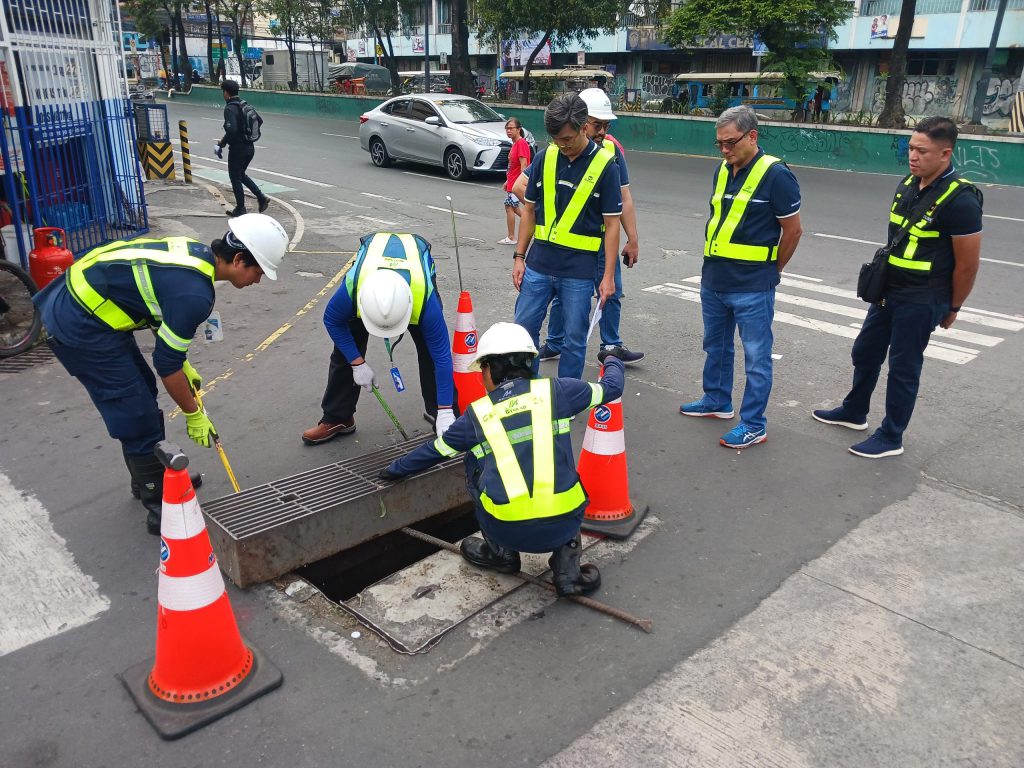
More than 90% of employees of Maynilad Water Services, Inc. (Maynilad) joined “Walk the Line” field activities in 2025, demonstrating the company’s commitment to inclusive, on-the-ground action in the fight against water loss.

With support from local government units and barangay officials, these employee deployments spanned 199 locations across 12 cities, covering over 1,070 kilometers of pipelines and resulting in more than 1,700 actual leak repairs. These outputs significantly bolstered ongoing water loss management activities, helping to expedite leak detection and response on the ground.

The initiative forms part of Maynilad’s broader campaign to reduce Non-Revenue Water (NRW) and improve service reliability for its customers across the West Zone.

“Walk the Line encourages employees from all levels to see, firsthand, the challenges our technical teams face on the ground. It’s a chance to help detect leaks, inspect pipelines, and identify signs of water loss,” said Central NRW Head Engr. Ryan B. Jamora. “Their observations and reports helped surface issues faster and contributed meaningfully to our field operations.”

The monthly field activities not only deepen internal appreciation for Maynilad’s water loss management efforts, they also reinforce a culture of sustainability and accountability within the organization.

“The ‘Walk the Line’ initiative reflects Maynilad’s commitment to responsible water stewardship. It shows how every individual—regardless of role—can make a real contribution toward sustainable resource management,” said Chief Sustainability Officer Atty. Roel S. Espiritu.

The program complements the company’s comprehensive NRW reduction strategy, which includes active leak detection, pressure management, pipe rehabilitation, and community engagement. Employee involvement is key to strengthening these efforts and ensuring long-term water security.

Maynilad uses cookies to improve our website and enhance your browsing experience. Read our Cookie Notice.

Bank of Commerce

ONLINE BANKING

Steps/Procedures Unavailable

MOBILE BANKING

Steps/Procedures Unavailable

BancNet

ONLINE BANKING

Steps/Procedures Unavailable

MOBILE BANKING

Steps/Procedures Unavailable

BDO

ONLINE BANKING

1.) Visit www.bdo.com.ph
2.) Click Online Banking Log in
3.) Click on Enroll Now
4.) Read the Terms and Conditions.
5.) Fill out the needed information
6.) Click Submit

MOBILE BANKING

1.) Download the BDO Personal Banking
2.) Click on Enroll Now
3.) Read the Terms and Conditions.
4.) Fill out the needed information
5.) Click Submit

BPI

ONLINE BANKING

1.) Go to BPI Expressonline (www.bpiexpressonline.com) then click on “Enroll Now”.
2.) Select your location from the options provided.
3.) Read the Terms and Conditions.
4.) Submit your deposit account information.
5.) Fill out the EOL REgistration Form.
6.) A confirmation page will appear.

MOBILE BANKING

1.) Download the BPI Mobile App
2.) Click on Log in
3.) Click on Register Now
4.) Read the Terms and Conditions.
5.) Fill out the needed information
6.) Click Submit

LandBank

ONLINE BANKING

1.) Visit www.lbpiaccess.com.ph
2.) Click on Enroll now
3.) Read the Terms and Conditions.
4.) Fill out the needed information
5.) Click Submit

MOBILE BANKING

1.) Download the Landbank Mobile App
2.) Enroll on lbpiAccess.com
3.) Use the log-in credentials to access the App

EastWest Bank

ONLINE BANKING

1.) Visit www.eastwestbanker.com
2.) Click Log in now and then Personal Account
3.) Click Sign me up
4.) Read the Terms and Conditions.
5.) Follow the steps and fill out the needed information
6.) Click Submit

MOBILE BANKING

1.) Download the Eastwest Mobile Banking App
2.) Click on Sign me up
3.) Read the Terms and Conditions.
4.) Fill out the needed information

MetroBank

ONLINE BANKING

1.) Visit personal.metrobankdirect.com
2.) Click on Sign up now
3.) Read the Terms and Conditions.
4.) Select the account that you would like to enroll
5.) Fill out the needed information
6.) Click Submit

MOBILE BANKING

1.) Download the Metrobank App
2.) Click on Sign up
3.) Read the Terms and Conditions.
4.) Fill out the needed information

Chinabank

ONLINE BANKING

Steps/Procedures Unavailable

MOBILE BANKING

1.) Download the CBS Personal App
2.) Click on Sign up
3.) Read the Terms and Conditions.
4.) Fill out the needed information

PSBank

ONLINE BANKING

1.) Visit www.psbank.com.ph
2.) Click Log in then Personal
3.) Click Register Account
4.) Read the Terms and Conditions.
5.) Fill out the needed information
6.) Click Submit

MOBILE BANKING

1.) Download the PSBANK Mobile App
2.) Click on Sign up Now
3.) Read the Terms and Conditions.
4.) Fill out the needed information

Security Bank

ONLINE BANKING

1.) Visit www.securitybank.com
2.) Click on Log in
3.) Click Enroll Now
4.) Read the Terms and Conditions.
5.) Choose the type of account to enroll
6.) Fill out the needed information
7.) Click Submit

MOBILE BANKING

Steps/Procedures Unavailable

UnionBank

ONLINE BANKING

1.) Visit www.unionbankph.com
2.) Click on UnionBank Online
3.) Click Sign Up Now
4.) Read the Terms and Conditions.
5.) Choose the type of account to enroll
6.) Fill out the needed information
7.) Click Submit

MOBILE BANKING

1.) Download the UnionBank App
2.) Click on Sign up with My Existing Account
3.) Read the Terms and Conditions.
4.) Choose the type of account to enroll
5.) Fill out the needed information

RCBC

ONLINE BANKING

1.) Visit www.rcbc.com
2.) Click on Log in Personal Online Banking
3.) Click Enroll Now
4.) Fill out the needed information
5.) Click Submit

MOBILE BANKING

1.) Download the RCBC App
2.) Click on Register
3.) Read the Terms and Conditions.
4.) Fill out the needed information

UCPB

ONLINE BANKING

1.) Visit www.ucpb.com
2.) Click on Connect Log in
3.) Click on New User
4.) Read the Terms and Conditions.
5.) Fill out the needed information
6.) Click Register

MOBILE BANKING

1.) Download the UCPB App
2.) Click on Enroll Now
3.) Read the Terms and Conditions.
4.) Fill out the needed information
5.) Click Register