
Maynilad uses cookies to improve our website and enhance your browsing experience. Read our Cookie Notice.

Maynilad News

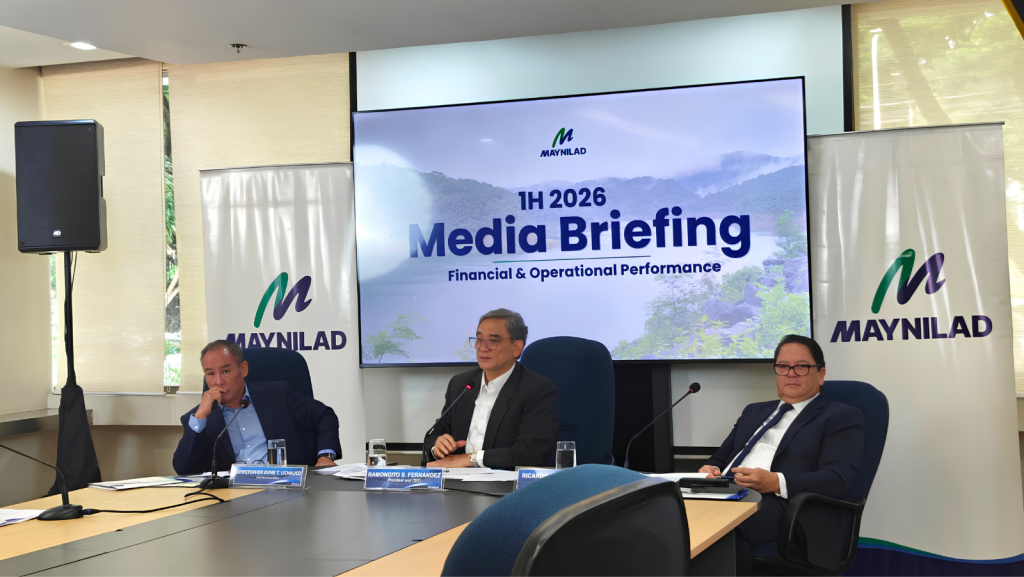
MAYNILAD REPORTS FIRST-HALF 2026 OPERATING AND FINANCIAL RESULTS

Share Via


MANILA, Philippines, August 4, 2026

FIRST HALF HIGHLIGHTS

  • Service coverage improved to 94.99%, while 24-hour water availability at minimum pressure (7 psi) reached 92.1%.
  • Wastewater coverage increased to 88% from 85% in the first half of 2025.
  • Non-Revenue Water (NRW) improved to 29.7% as of end June 2026, compared to 35.25% as of end June 2025.
  • Capital expenditures reached ₱12.89 billion, 18.9% higher year-on-year reflecting investments in network efficiency, water service improvements, and wastewater coverage.
  • Revenues grew 4.1% to ₱19.11 billion, supported by a 2.9% increase in billed volume and continued customer growth.
  • EBITDA rose 7.5% to ₱13.70 billion, while net income increased 14.0% to ₱8.51 billion.


Maynilad Water Services, Inc. (“Maynilad”) continued to strengthen water resilience, improve water service, and expand wastewater coverage during the first half of 2026, supported by continued investments in infrastructure and network reliability.

OPERATING PERFORMANCE

WATER

Service coverage improved to 94.99% from 94.76% in the same period last year. The company reported 24-hour water availability at minimum pressure (7 psi) of 92.1%. Total billed connections reached 1,587,621, up 1.6% year-on-year.

Maynilad also continued to improve network efficiency, with Non-Revenue water declining to 29.7% as of end-June 2026 from 35.25% as of end-June 2025. 

WASTEWATER COVERAGE

Maynilad continued to expand its wastewater coverage supporting public health and environmental protection across its concession area.

Wastewater coverage improved to 88% from 85% in the first half of 2025.  Sewerage coverage increased to 26% from 25%, while sanitation coverage improved to 62% from 60%. The number of accounts offered sanitation services rose 7.9% to 200,577, while the number of septic tanks emptied increased 10.7% to 55,825.

CAPITAL EXPENDITURES

Capital expenditures reached ₱12.89 billion during the first half of 2026, 18.9% higher than the ₱10.85 billion invested during the same period last year.

The investments supported Maynilad’s water and wastewater infrastructure, network efficiency, network reliability, production facilities, and customer service improvement programs.

FINANCIAL HIGHLIGHTS

The operational gains, together with higher billed volume and continued customer growth, supported Maynilad’s unaudited consolidated revenues of ₱19.11 billion for the first half of 2026, up 4.1% from ₱18.35 billion in the same period last year. Billed volume increased 2.9% to 280.8 million cubic meters, while billed connections grew 1.6% to 1,587,621.

EBITDA increased 7.5% to ₱13.70 billion, with EBITDA margin improving to 71.7% from 69.4%, supported by improved NRW levels and various cost-control initiatives.

Net income rose 14.0% to ₱8.51 billion from ₱7.47 billion, mainly reflecting lower interest expense and lower taxes, which more than offset the increase in operating expenses.

OUTLOOK

“Our first-half performance reflects continued progress in improving service delivery, enhancing network efficiency, and expanding wastewater and sanitation coverage. These operational gains, supported by sustained capital investments, contributed to the company’s financial results. We remain focused on strengthening supply and network resilience and ensuring that our investments translate into better service and long-term value for our customers and stakeholders,” said Maynilad President and CEO Ramoncito S. Fernandez.

FORWARD-LOOKING STATEMENT

This press release may contain forward-looking statements that are subject to risks and uncertainties that could cause actual results to differ materially from those expressed or implied. These statements are based on current expectations and assumptions, and Maynilad undertakes no obligation to update such forward-looking statements except as required by applicable law.

Maynilad uses cookies to improve our website and enhance your browsing experience. Read our Cookie Notice.

Bank of Commerce

ONLINE BANKING

Steps/Procedures Unavailable

MOBILE BANKING

Steps/Procedures Unavailable

BancNet

ONLINE BANKING

Steps/Procedures Unavailable

MOBILE BANKING

Steps/Procedures Unavailable

BDO

ONLINE BANKING

1.) Visit www.bdo.com.ph
2.) Click Online Banking Log in
3.) Click on Enroll Now
4.) Read the Terms and Conditions.
5.) Fill out the needed information
6.) Click Submit

MOBILE BANKING

1.) Download the BDO Personal Banking
2.) Click on Enroll Now
3.) Read the Terms and Conditions.
4.) Fill out the needed information
5.) Click Submit

BPI

ONLINE BANKING

1.) Go to BPI Expressonline (www.bpiexpressonline.com) then click on “Enroll Now”.
2.) Select your location from the options provided.
3.) Read the Terms and Conditions.
4.) Submit your deposit account information.
5.) Fill out the EOL REgistration Form.
6.) A confirmation page will appear.

MOBILE BANKING

1.) Download the BPI Mobile App
2.) Click on Log in
3.) Click on Register Now
4.) Read the Terms and Conditions.
5.) Fill out the needed information
6.) Click Submit

LandBank

ONLINE BANKING

1.) Visit www.lbpiaccess.com.ph
2.) Click on Enroll now
3.) Read the Terms and Conditions.
4.) Fill out the needed information
5.) Click Submit

MOBILE BANKING

1.) Download the Landbank Mobile App
2.) Enroll on lbpiAccess.com
3.) Use the log-in credentials to access the App

EastWest Bank

ONLINE BANKING

1.) Visit www.eastwestbanker.com
2.) Click Log in now and then Personal Account
3.) Click Sign me up
4.) Read the Terms and Conditions.
5.) Follow the steps and fill out the needed information
6.) Click Submit

MOBILE BANKING

1.) Download the Eastwest Mobile Banking App
2.) Click on Sign me up
3.) Read the Terms and Conditions.
4.) Fill out the needed information

MetroBank

ONLINE BANKING

1.) Visit personal.metrobankdirect.com
2.) Click on Sign up now
3.) Read the Terms and Conditions.
4.) Select the account that you would like to enroll
5.) Fill out the needed information
6.) Click Submit

MOBILE BANKING

1.) Download the Metrobank App
2.) Click on Sign up
3.) Read the Terms and Conditions.
4.) Fill out the needed information

Chinabank

ONLINE BANKING

Steps/Procedures Unavailable

MOBILE BANKING

1.) Download the CBS Personal App
2.) Click on Sign up
3.) Read the Terms and Conditions.
4.) Fill out the needed information

PSBank

ONLINE BANKING

1.) Visit www.psbank.com.ph
2.) Click Log in then Personal
3.) Click Register Account
4.) Read the Terms and Conditions.
5.) Fill out the needed information
6.) Click Submit

MOBILE BANKING

1.) Download the PSBANK Mobile App
2.) Click on Sign up Now
3.) Read the Terms and Conditions.
4.) Fill out the needed information

Security Bank

ONLINE BANKING

1.) Visit www.securitybank.com
2.) Click on Log in
3.) Click Enroll Now
4.) Read the Terms and Conditions.
5.) Choose the type of account to enroll
6.) Fill out the needed information
7.) Click Submit

MOBILE BANKING

Steps/Procedures Unavailable

UnionBank

ONLINE BANKING

1.) Visit www.unionbankph.com
2.) Click on UnionBank Online
3.) Click Sign Up Now
4.) Read the Terms and Conditions.
5.) Choose the type of account to enroll
6.) Fill out the needed information
7.) Click Submit

MOBILE BANKING

1.) Download the UnionBank App
2.) Click on Sign up with My Existing Account
3.) Read the Terms and Conditions.
4.) Choose the type of account to enroll
5.) Fill out the needed information

RCBC

ONLINE BANKING

1.) Visit www.rcbc.com
2.) Click on Log in Personal Online Banking
3.) Click Enroll Now
4.) Fill out the needed information
5.) Click Submit

MOBILE BANKING

1.) Download the RCBC App
2.) Click on Register
3.) Read the Terms and Conditions.
4.) Fill out the needed information

UCPB

ONLINE BANKING

1.) Visit www.ucpb.com
2.) Click on Connect Log in
3.) Click on New User
4.) Read the Terms and Conditions.
5.) Fill out the needed information
6.) Click Register

MOBILE BANKING

1.) Download the UCPB App
2.) Click on Enroll Now
3.) Read the Terms and Conditions.
4.) Fill out the needed information
5.) Click Register