
Maynilad uses cookies to improve our website and enhance your browsing experience. Read our Cookie Notice.

Maynilad News

Maynilad’s ₱5.8-B distribution pipeline nears completion, supports El Niño preparedness

Share Via


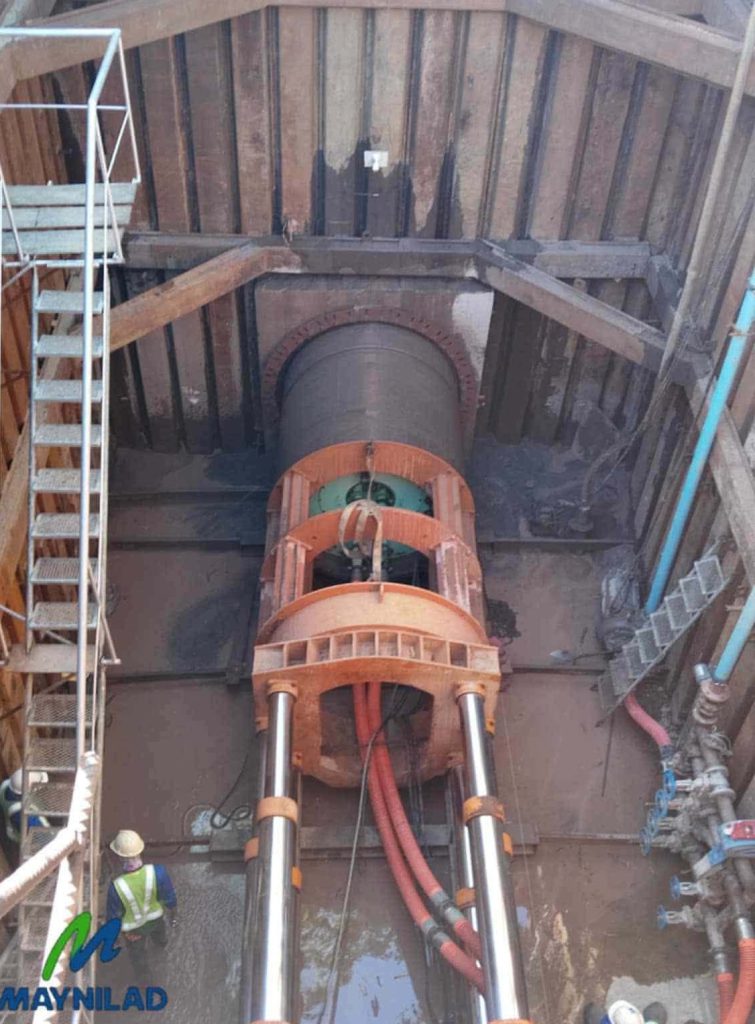
West Zone concessionaire Maynilad Water Services, Inc. (Maynilad) is nearing completion of primary distribution pipelines with a combined length of 9.12 kilometers that will enable the company to distribute more water produced in the southern portion of its concession area to customers in Muntinlupa and Las Piñas.

The approximately ₱5.8-billion project will connect the Poblacion Water Treatment Plant in Muntinlupa more extensively to Maynilad’s distribution network, increasing the company’s capacity to deliver water from its southern facilities to areas where additional supply is needed.

Once fully commissioned and integrated into the network, the new pipelines will improve the distribution of water across the southern part of the West Zone, support better pressure management, and enhance supply reliability by giving Maynilad greater flexibility to serve different areas from available sources when needed.

The project is a key component of Maynilad’s preparations for the potential effects of El Niño. According to PAGASA, El Niño conditions are present in the tropical Pacific and are expected to strengthen in the coming months, increasing the likelihood of below-normal rainfall, dry spells, and drought in parts of the country.

“Investments such as this are part of our continuing effort to build a more resilient water system for the West Zone. As climate conditions become more challenging, we need infrastructure that allows us to maximize available supply, manage constraints more effectively, and better support our customers during periods of tighter raw water availability,” said Maynilad Chief Operating Officer Christopher Jaime T. Lichauco.

The primary distribution pipelines complement Maynilad’s broader water-security program, which includes tapping supplemental water sources such as Laguna Lake, developing modular treatment plants and potable water reuse facilities, expanding storage capacity, reducing water losses, and improving network and pressure management.

Together, these initiatives are intended to reduce Maynilad’s reliance on a single water source, strengthen system flexibility, and support service reliability during prolonged dry conditions.

Maynilad operates the largest water concession by population served within a single concession area in the Philippines. It is a concessionaire of the Metropolitan Waterworks and Sewerage System for the West Zone of the Greater Manila Area, which is composed of the cities of Manila, Quezon City, and Makati, certain portions; Caloocan, Pasay, Parañaque, Las Piñas, Muntinlupa, Valenzuela, Navotas, and Malabon, all in Metro Manila; and the cities of Cavite, Bacoor, and Imus, and the municipalities of Kawit, Noveleta, and Rosario, all in Cavite Province.

PHOTO CAPTION: Maynilad is nearing completion of primary distribution pipelines with a combined length of 9.12 kilometers that will help improve the delivery of water from its southern facilities to customers in Muntinlupa and Las Piñas.

Maynilad uses cookies to improve our website and enhance your browsing experience. Read our Cookie Notice.

Bank of Commerce

ONLINE BANKING

Steps/Procedures Unavailable

MOBILE BANKING

Steps/Procedures Unavailable

BancNet

ONLINE BANKING

Steps/Procedures Unavailable

MOBILE BANKING

Steps/Procedures Unavailable

BDO

ONLINE BANKING

1.) Visit www.bdo.com.ph
2.) Click Online Banking Log in
3.) Click on Enroll Now
4.) Read the Terms and Conditions.
5.) Fill out the needed information
6.) Click Submit

MOBILE BANKING

1.) Download the BDO Personal Banking
2.) Click on Enroll Now
3.) Read the Terms and Conditions.
4.) Fill out the needed information
5.) Click Submit

BPI

ONLINE BANKING

1.) Go to BPI Expressonline (www.bpiexpressonline.com) then click on “Enroll Now”.
2.) Select your location from the options provided.
3.) Read the Terms and Conditions.
4.) Submit your deposit account information.
5.) Fill out the EOL REgistration Form.
6.) A confirmation page will appear.

MOBILE BANKING

1.) Download the BPI Mobile App
2.) Click on Log in
3.) Click on Register Now
4.) Read the Terms and Conditions.
5.) Fill out the needed information
6.) Click Submit

LandBank

ONLINE BANKING

1.) Visit www.lbpiaccess.com.ph
2.) Click on Enroll now
3.) Read the Terms and Conditions.
4.) Fill out the needed information
5.) Click Submit

MOBILE BANKING

1.) Download the Landbank Mobile App
2.) Enroll on lbpiAccess.com
3.) Use the log-in credentials to access the App

EastWest Bank

ONLINE BANKING

1.) Visit www.eastwestbanker.com
2.) Click Log in now and then Personal Account
3.) Click Sign me up
4.) Read the Terms and Conditions.
5.) Follow the steps and fill out the needed information
6.) Click Submit

MOBILE BANKING

1.) Download the Eastwest Mobile Banking App
2.) Click on Sign me up
3.) Read the Terms and Conditions.
4.) Fill out the needed information

MetroBank

ONLINE BANKING

1.) Visit personal.metrobankdirect.com
2.) Click on Sign up now
3.) Read the Terms and Conditions.
4.) Select the account that you would like to enroll
5.) Fill out the needed information
6.) Click Submit

MOBILE BANKING

1.) Download the Metrobank App
2.) Click on Sign up
3.) Read the Terms and Conditions.
4.) Fill out the needed information

Chinabank

ONLINE BANKING

Steps/Procedures Unavailable

MOBILE BANKING

1.) Download the CBS Personal App
2.) Click on Sign up
3.) Read the Terms and Conditions.
4.) Fill out the needed information

PSBank

ONLINE BANKING

1.) Visit www.psbank.com.ph
2.) Click Log in then Personal
3.) Click Register Account
4.) Read the Terms and Conditions.
5.) Fill out the needed information
6.) Click Submit

MOBILE BANKING

1.) Download the PSBANK Mobile App
2.) Click on Sign up Now
3.) Read the Terms and Conditions.
4.) Fill out the needed information

Security Bank

ONLINE BANKING

1.) Visit www.securitybank.com
2.) Click on Log in
3.) Click Enroll Now
4.) Read the Terms and Conditions.
5.) Choose the type of account to enroll
6.) Fill out the needed information
7.) Click Submit

MOBILE BANKING

Steps/Procedures Unavailable

UnionBank

ONLINE BANKING

1.) Visit www.unionbankph.com
2.) Click on UnionBank Online
3.) Click Sign Up Now
4.) Read the Terms and Conditions.
5.) Choose the type of account to enroll
6.) Fill out the needed information
7.) Click Submit

MOBILE BANKING

1.) Download the UnionBank App
2.) Click on Sign up with My Existing Account
3.) Read the Terms and Conditions.
4.) Choose the type of account to enroll
5.) Fill out the needed information

RCBC

ONLINE BANKING

1.) Visit www.rcbc.com
2.) Click on Log in Personal Online Banking
3.) Click Enroll Now
4.) Fill out the needed information
5.) Click Submit

MOBILE BANKING

1.) Download the RCBC App
2.) Click on Register
3.) Read the Terms and Conditions.
4.) Fill out the needed information

UCPB

ONLINE BANKING

1.) Visit www.ucpb.com
2.) Click on Connect Log in
3.) Click on New User
4.) Read the Terms and Conditions.
5.) Fill out the needed information
6.) Click Register

MOBILE BANKING

1.) Download the UCPB App
2.) Click on Enroll Now
3.) Read the Terms and Conditions.
4.) Fill out the needed information
5.) Click Register