
Maynilad uses cookies to improve our website and enhance your browsing experience. Read our Cookie Notice.

Maynilad News

Maynilad targets record 230,000 trees for 2026 Ipo Watershed restoration

Share Via


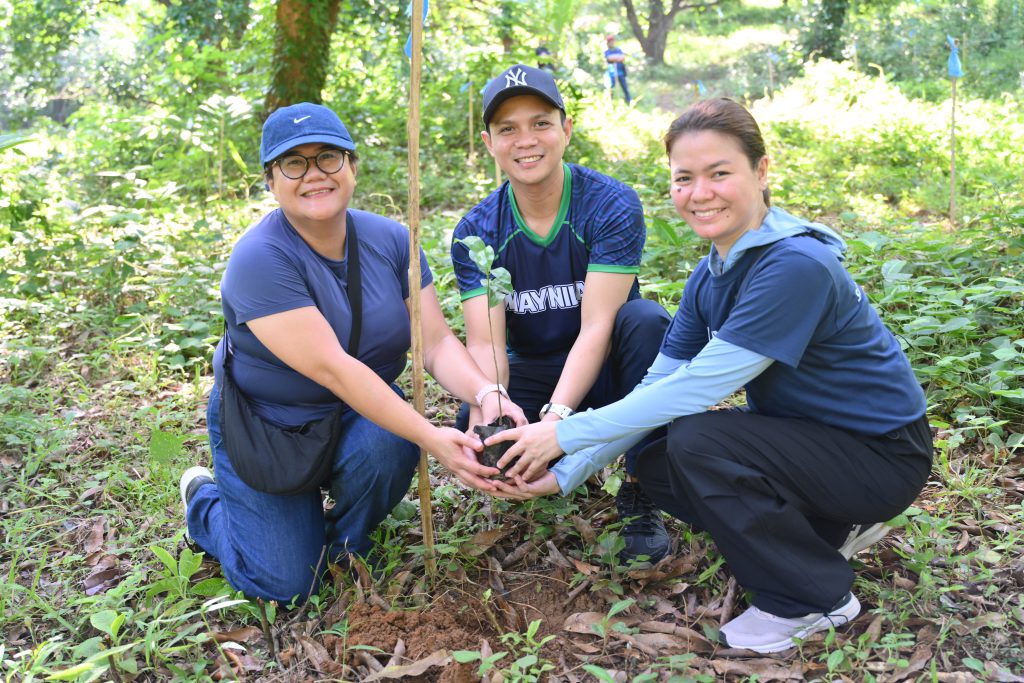
West Zone concessionaire Maynilad Water Services, Inc. (Maynilad) has begun its 2026 Plant for Life program, setting its highest annual planting target to date: 230,225 indigenous tree seedlings across 450 hectares of priority restoration areas within the Ipo Watershed.

The 2026 planting sites cover areas in Norzagaray, Bulacan, and Mt. Balagbag in Rizal, both of which form part of the Ipo Watershed. The sites were identified in coordination with the Department of Environment and Natural Resources (DENR) as priority areas for forest restoration.

The Ipo Watershed is a critical part of the Angat-Ipo raw water system, which supplies water to Metro Manila. Reforesting denuded portions of the watershed helps reduce soil erosion and sedimentation, improve water infiltration, support biodiversity, and strengthen the long-term sustainability of this vital water source.

Unlike one-day planting activities, Plant for Life provides for three years of site maintenance through partnerships with local people’s organizations. Their work includes regular monitoring, protection of planted areas, vegetation management, and replacement planting when necessary to improve seedling survival and support long-term forest restoration.

The program has maintained a seedling survival rate of more than 85% over the past seven years. In 2025, a 450-hectare restoration site covering Mt. Balagbag and Norzagaray recorded an overall seedling survival rate of 92.1%, as validated by the DENR.

“Watershed restoration is measured not only by how many seedlings are planted, but by how many are able to survive and become part of a functioning forest,” said Maynilad Chief Sustainability Officer Atty. Roel S. Espiritu. “By combining indigenous tree planting with sustained site care and community stewardship, we help strengthen the natural systems that support water quality, water availability, and the resilience of nearby communities.”

Indigenous species such as narra, kupang, and kalumpit will be planted under this year’s program to help restore biodiversity and establish vegetation suited to local watershed conditions.

Since Plant for Life was established in 2007, Maynilad has planted more than 1.64 million seedlings and supported the restoration of nearly 2,420 hectares of watershed and other environmentally critical areas. The 2026 Plant for Life kickoff brought together Maynilad employee volunteers and representatives from TELUS, Metro Pacific Tollways Corporation, GHD, Makati Medical Center, Light Rail Manila Corporation, and World Vision.

PHOTO CAPTION: Maynilad employee volunteers plant indigenous tree seedlings during the kickoff of the 2026 Plant for Life program in the Ipo Watershed. The program targets 230,225 seedlings across 450 hectares this year, supporting Maynilad’s continuing efforts to restore and protect critical watershed areas.

Maynilad uses cookies to improve our website and enhance your browsing experience. Read our Cookie Notice.

Bank of Commerce

ONLINE BANKING

Steps/Procedures Unavailable

MOBILE BANKING

Steps/Procedures Unavailable

BancNet

ONLINE BANKING

Steps/Procedures Unavailable

MOBILE BANKING

Steps/Procedures Unavailable

BDO

ONLINE BANKING

1.) Visit www.bdo.com.ph
2.) Click Online Banking Log in
3.) Click on Enroll Now
4.) Read the Terms and Conditions.
5.) Fill out the needed information
6.) Click Submit

MOBILE BANKING

1.) Download the BDO Personal Banking
2.) Click on Enroll Now
3.) Read the Terms and Conditions.
4.) Fill out the needed information
5.) Click Submit

BPI

ONLINE BANKING

1.) Go to BPI Expressonline (www.bpiexpressonline.com) then click on “Enroll Now”.
2.) Select your location from the options provided.
3.) Read the Terms and Conditions.
4.) Submit your deposit account information.
5.) Fill out the EOL REgistration Form.
6.) A confirmation page will appear.

MOBILE BANKING

1.) Download the BPI Mobile App
2.) Click on Log in
3.) Click on Register Now
4.) Read the Terms and Conditions.
5.) Fill out the needed information
6.) Click Submit

LandBank

ONLINE BANKING

1.) Visit www.lbpiaccess.com.ph
2.) Click on Enroll now
3.) Read the Terms and Conditions.
4.) Fill out the needed information
5.) Click Submit

MOBILE BANKING

1.) Download the Landbank Mobile App
2.) Enroll on lbpiAccess.com
3.) Use the log-in credentials to access the App

EastWest Bank

ONLINE BANKING

1.) Visit www.eastwestbanker.com
2.) Click Log in now and then Personal Account
3.) Click Sign me up
4.) Read the Terms and Conditions.
5.) Follow the steps and fill out the needed information
6.) Click Submit

MOBILE BANKING

1.) Download the Eastwest Mobile Banking App
2.) Click on Sign me up
3.) Read the Terms and Conditions.
4.) Fill out the needed information

MetroBank

ONLINE BANKING

1.) Visit personal.metrobankdirect.com
2.) Click on Sign up now
3.) Read the Terms and Conditions.
4.) Select the account that you would like to enroll
5.) Fill out the needed information
6.) Click Submit

MOBILE BANKING

1.) Download the Metrobank App
2.) Click on Sign up
3.) Read the Terms and Conditions.
4.) Fill out the needed information

Chinabank

ONLINE BANKING

Steps/Procedures Unavailable

MOBILE BANKING

1.) Download the CBS Personal App
2.) Click on Sign up
3.) Read the Terms and Conditions.
4.) Fill out the needed information

PSBank

ONLINE BANKING

1.) Visit www.psbank.com.ph
2.) Click Log in then Personal
3.) Click Register Account
4.) Read the Terms and Conditions.
5.) Fill out the needed information
6.) Click Submit

MOBILE BANKING

1.) Download the PSBANK Mobile App
2.) Click on Sign up Now
3.) Read the Terms and Conditions.
4.) Fill out the needed information

Security Bank

ONLINE BANKING

1.) Visit www.securitybank.com
2.) Click on Log in
3.) Click Enroll Now
4.) Read the Terms and Conditions.
5.) Choose the type of account to enroll
6.) Fill out the needed information
7.) Click Submit

MOBILE BANKING

Steps/Procedures Unavailable

UnionBank

ONLINE BANKING

1.) Visit www.unionbankph.com
2.) Click on UnionBank Online
3.) Click Sign Up Now
4.) Read the Terms and Conditions.
5.) Choose the type of account to enroll
6.) Fill out the needed information
7.) Click Submit

MOBILE BANKING

1.) Download the UnionBank App
2.) Click on Sign up with My Existing Account
3.) Read the Terms and Conditions.
4.) Choose the type of account to enroll
5.) Fill out the needed information

RCBC

ONLINE BANKING

1.) Visit www.rcbc.com
2.) Click on Log in Personal Online Banking
3.) Click Enroll Now
4.) Fill out the needed information
5.) Click Submit

MOBILE BANKING

1.) Download the RCBC App
2.) Click on Register
3.) Read the Terms and Conditions.
4.) Fill out the needed information

UCPB

ONLINE BANKING

1.) Visit www.ucpb.com
2.) Click on Connect Log in
3.) Click on New User
4.) Read the Terms and Conditions.
5.) Fill out the needed information
6.) Click Register

MOBILE BANKING

1.) Download the UCPB App
2.) Click on Enroll Now
3.) Read the Terms and Conditions.
4.) Fill out the needed information
5.) Click Register