
Maynilad uses cookies to improve our website and enhance your browsing experience. Read our Cookie Notice.

Maynilad News

Maynilad begins partial operation of raw water reservoir, strengthens supply buffer during dry season

Share Via


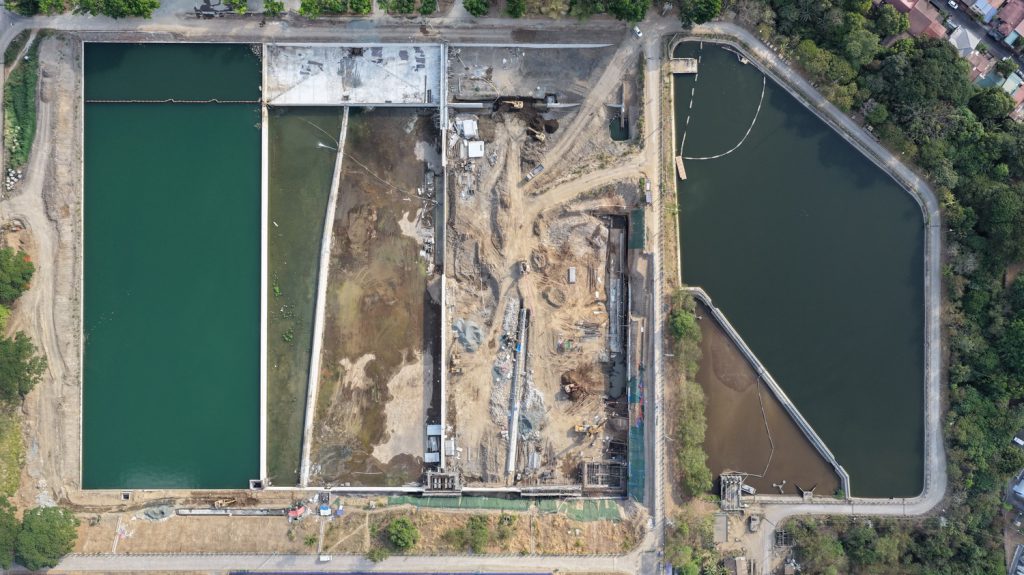
West Zone concessionaire Maynilad Water Services, Inc. (Maynilad) has begun partial operation of its raw water reservoir at the La Mesa Water Treatment Plant (WTP) in Quezon City, enabling the storage of up to 67 million liters of raw water to help stabilize supply during the dry season.

The initial utilization of one converted lagoon within the La Mesa WTP supports Maynilad’s efforts to improve operational flexibility, particularly during periods when inflows from the Angat–Ipo Dam system are reduced due to lower rainfall or allocation adjustments.

The project—targeted for full completion by June 2026—involves the repurposing of former sludge lagoons within the La Mesa compound into a six-meter-deep impounding reservoir capable of storing up to 200 million liters of raw water.

Previously used for sludge handling in the treatment process, the lagoons have been converted into a dedicated raw water storage facility, marking a shift from internal process use to system-level supply support.

Once fully operational, the reservoir will provide La Mesa Water Treatment Plant 1 with an additional raw water buffer, enabling more stable plant operations and helping sustain water service during periods of reduced inflow.

The facility may also serve as a settling basin during periods of elevated turbidity, allowing suspended particles in raw water to settle naturally before entering the treatment process. This helps support more efficient treatment operations during challenging raw water conditions.

“This facility enhances our ability to manage raw water variability and maintain stable treatment operations, particularly during periods of lower inflow or higher turbidity,” said Maynilad Chief Operating Officer Christopher Jaime T. Lichauco.

Once completed, the facility will be Maynilad’s first dedicated raw water storage reservoir, complementing its 38 existing reservoirs for treated water across the West Zone.

Maynilad continues to invest in strategic infrastructure projects that strengthen system resilience and ensure reliable water service for the communities it serves. Maynilad operates the largest water concession by population served within a single concession area in the Philippines. It is a concessionaire of the Metropolitan Waterworks and Sewerage System (MWSS) for the West Zone of the Greater Manila Area, which is composed of the cities of Manila (certain portions), Quezon City (certain portions), Makati (west of South Super Highway), Caloocan, Pasay, Parañaque, Las Piñas, Muntinlupa, Valenzuela, Navotas and Malabon all in Metro Manila; the cities of Cavite, Bacoor and Imus, and the municipalities of Kawit, Noveleta and Rosario, all in Cavite Province.

PHOTO CAPTION: Aerial view of Maynilad’s raw water reservoir project at the La Mesa Water Treatment Plant in Quezon City, where one converted lagoon is now partially operational to help support water supply during the dry season.

Maynilad uses cookies to improve our website and enhance your browsing experience. Read our Cookie Notice.

Bank of Commerce

ONLINE BANKING

Steps/Procedures Unavailable

MOBILE BANKING

Steps/Procedures Unavailable

BancNet

ONLINE BANKING

Steps/Procedures Unavailable

MOBILE BANKING

Steps/Procedures Unavailable

BDO

ONLINE BANKING

1.) Visit www.bdo.com.ph
2.) Click Online Banking Log in
3.) Click on Enroll Now
4.) Read the Terms and Conditions.
5.) Fill out the needed information
6.) Click Submit

MOBILE BANKING

1.) Download the BDO Personal Banking
2.) Click on Enroll Now
3.) Read the Terms and Conditions.
4.) Fill out the needed information
5.) Click Submit

BPI

ONLINE BANKING

1.) Go to BPI Expressonline (www.bpiexpressonline.com) then click on “Enroll Now”.
2.) Select your location from the options provided.
3.) Read the Terms and Conditions.
4.) Submit your deposit account information.
5.) Fill out the EOL REgistration Form.
6.) A confirmation page will appear.

MOBILE BANKING

1.) Download the BPI Mobile App
2.) Click on Log in
3.) Click on Register Now
4.) Read the Terms and Conditions.
5.) Fill out the needed information
6.) Click Submit

LandBank

ONLINE BANKING

1.) Visit www.lbpiaccess.com.ph
2.) Click on Enroll now
3.) Read the Terms and Conditions.
4.) Fill out the needed information
5.) Click Submit

MOBILE BANKING

1.) Download the Landbank Mobile App
2.) Enroll on lbpiAccess.com
3.) Use the log-in credentials to access the App

EastWest Bank

ONLINE BANKING

1.) Visit www.eastwestbanker.com
2.) Click Log in now and then Personal Account
3.) Click Sign me up
4.) Read the Terms and Conditions.
5.) Follow the steps and fill out the needed information
6.) Click Submit

MOBILE BANKING

1.) Download the Eastwest Mobile Banking App
2.) Click on Sign me up
3.) Read the Terms and Conditions.
4.) Fill out the needed information

MetroBank

ONLINE BANKING

1.) Visit personal.metrobankdirect.com
2.) Click on Sign up now
3.) Read the Terms and Conditions.
4.) Select the account that you would like to enroll
5.) Fill out the needed information
6.) Click Submit

MOBILE BANKING

1.) Download the Metrobank App
2.) Click on Sign up
3.) Read the Terms and Conditions.
4.) Fill out the needed information

Chinabank

ONLINE BANKING

Steps/Procedures Unavailable

MOBILE BANKING

1.) Download the CBS Personal App
2.) Click on Sign up
3.) Read the Terms and Conditions.
4.) Fill out the needed information

PSBank

ONLINE BANKING

1.) Visit www.psbank.com.ph
2.) Click Log in then Personal
3.) Click Register Account
4.) Read the Terms and Conditions.
5.) Fill out the needed information
6.) Click Submit

MOBILE BANKING

1.) Download the PSBANK Mobile App
2.) Click on Sign up Now
3.) Read the Terms and Conditions.
4.) Fill out the needed information

Security Bank

ONLINE BANKING

1.) Visit www.securitybank.com
2.) Click on Log in
3.) Click Enroll Now
4.) Read the Terms and Conditions.
5.) Choose the type of account to enroll
6.) Fill out the needed information
7.) Click Submit

MOBILE BANKING

Steps/Procedures Unavailable

UnionBank

ONLINE BANKING

1.) Visit www.unionbankph.com
2.) Click on UnionBank Online
3.) Click Sign Up Now
4.) Read the Terms and Conditions.
5.) Choose the type of account to enroll
6.) Fill out the needed information
7.) Click Submit

MOBILE BANKING

1.) Download the UnionBank App
2.) Click on Sign up with My Existing Account
3.) Read the Terms and Conditions.
4.) Choose the type of account to enroll
5.) Fill out the needed information

RCBC

ONLINE BANKING

1.) Visit www.rcbc.com
2.) Click on Log in Personal Online Banking
3.) Click Enroll Now
4.) Fill out the needed information
5.) Click Submit

MOBILE BANKING

1.) Download the RCBC App
2.) Click on Register
3.) Read the Terms and Conditions.
4.) Fill out the needed information

UCPB

ONLINE BANKING

1.) Visit www.ucpb.com
2.) Click on Connect Log in
3.) Click on New User
4.) Read the Terms and Conditions.
5.) Fill out the needed information
6.) Click Register

MOBILE BANKING

1.) Download the UCPB App
2.) Click on Enroll Now
3.) Read the Terms and Conditions.
4.) Fill out the needed information
5.) Click Register