
Maynilad uses cookies to improve our website and enhance your browsing experience. Read our Cookie Notice.

Maynilad News

Maynilad cuts water losses to 36.2%, recovers 970 MLD since 2006

Share Via


West Zone concessionaire Maynilad Water Services, Inc. (Maynilad) has reduced its non-revenue water (NRW) level to 36.2% as of Q1 2025, a significant improvement from 66.4% in 2006—the year the company was re-privatized.

This achievement translates to the recovery of 970 MLD—enough to meet the daily needs of millions of residents in the West Zone—through sustained investments and operational improvements over nearly two decades.

Maynilad inherited one of the oldest and most leak-prone pipeline systems from the Metropolitan Waterworks and Sewerage System (MWSS). Its NRW reduction was achieved despite these challenging network conditions, requiring extensive technical interventions and capital expenditures.

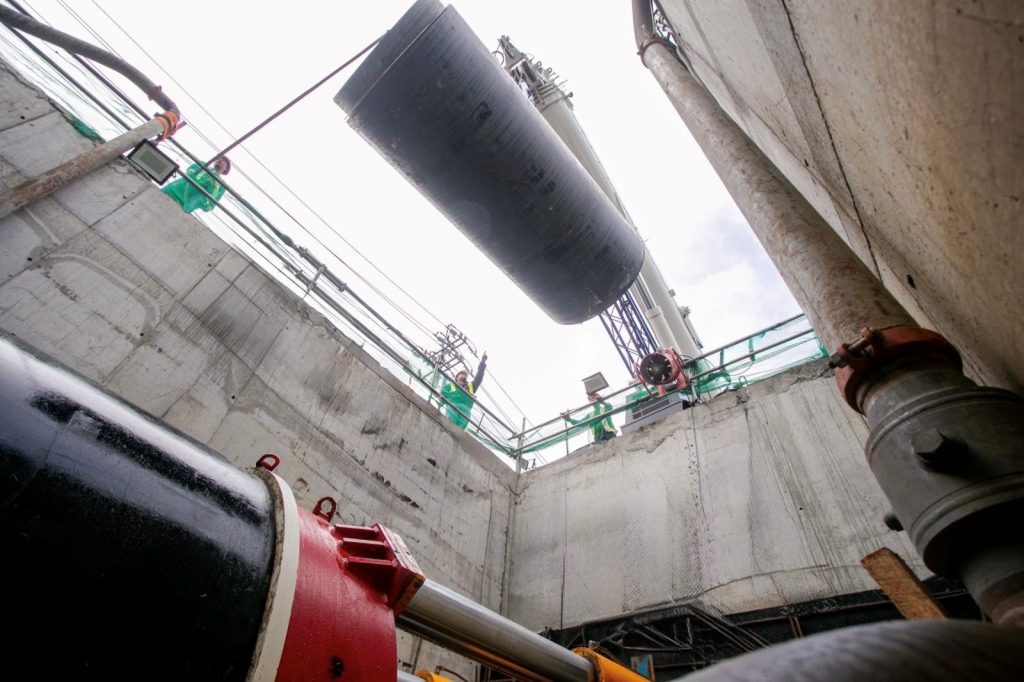
Maynilad’s NRW Management Program includes the creation of District Metered Areas (DMAs), advanced network diagnostics, active leak detection and repair, massive pipe replacement projects, and strict meter management. As of Q1 2025, Maynilad has replaced 3,293 kilometers of aging pipelines and repaired over 18,000 pipe leaks in just the first quarter of the year.

“Reducing water losses in a highly complex and aged network like ours requires long-term investment and continuous innovation. This milestone underscores our commitment to enhancing operational efficiency and achieving our NRW targets,” said Maynilad Central NRW Head Engr. Ryan Jamora.

According to its IPO Prospectus, Maynilad aims to further reduce NRW to 25% by 2027 and 20% by 2030, maintaining this level until the end of the concession period. Maynilad is the largest private water concessionaire of Metropolitan Waterworks and Sewerage System (MWSS) in the Philippines in terms of customer base. Its service area includes the cities of Manila (all but portions of San Andres and Sta. Ana), Quezon City (west of San Juan River, West Avenue, EDSA, Congressional, Mindanao Avenue, the northern part starting from the Districts of Holy Spirit and Batasan Hills), Makati (west of South Super Highway), Caloocan, Pasay, Parañaque, Las Piñas, Muntinlupa, Valenzuela, Navotas, and Malabon, all in Metro Manila; and the cities of Cavite, Bacoor, and Imus, and the municipalities of Kawit, Noveleta, and Rosario, all in the province of Cavite.

PHOTO CAPTION: LOWERING LOSSES, ONE PIPE AT A TIME. Maynilad replaces aging pipelines as part of its long-term Non-Revenue Water (NRW) Management Program. As of Q1 2025, the West Zone concessionaire has brought down water losses to 36.2%, recovering 970 million liters of water per day since 2006.


Maynilad uses cookies to improve our website and enhance your browsing experience. Read our Cookie Notice.

Bank of Commerce

ONLINE BANKING

Steps/Procedures Unavailable

MOBILE BANKING

Steps/Procedures Unavailable

BancNet

ONLINE BANKING

Steps/Procedures Unavailable

MOBILE BANKING

Steps/Procedures Unavailable

BDO

ONLINE BANKING

1.) Visit www.bdo.com.ph
2.) Click Online Banking Log in
3.) Click on Enroll Now
4.) Read the Terms and Conditions.
5.) Fill out the needed information
6.) Click Submit

MOBILE BANKING

1.) Download the BDO Personal Banking
2.) Click on Enroll Now
3.) Read the Terms and Conditions.
4.) Fill out the needed information
5.) Click Submit

BPI

ONLINE BANKING

1.) Go to BPI Expressonline (www.bpiexpressonline.com) then click on “Enroll Now”.
2.) Select your location from the options provided.
3.) Read the Terms and Conditions.
4.) Submit your deposit account information.
5.) Fill out the EOL REgistration Form.
6.) A confirmation page will appear.

MOBILE BANKING

1.) Download the BPI Mobile App
2.) Click on Log in
3.) Click on Register Now
4.) Read the Terms and Conditions.
5.) Fill out the needed information
6.) Click Submit

LandBank

ONLINE BANKING

1.) Visit www.lbpiaccess.com.ph
2.) Click on Enroll now
3.) Read the Terms and Conditions.
4.) Fill out the needed information
5.) Click Submit

MOBILE BANKING

1.) Download the Landbank Mobile App
2.) Enroll on lbpiAccess.com
3.) Use the log-in credentials to access the App

EastWest Bank

ONLINE BANKING

1.) Visit www.eastwestbanker.com
2.) Click Log in now and then Personal Account
3.) Click Sign me up
4.) Read the Terms and Conditions.
5.) Follow the steps and fill out the needed information
6.) Click Submit

MOBILE BANKING

1.) Download the Eastwest Mobile Banking App
2.) Click on Sign me up
3.) Read the Terms and Conditions.
4.) Fill out the needed information

MetroBank

ONLINE BANKING

1.) Visit personal.metrobankdirect.com
2.) Click on Sign up now
3.) Read the Terms and Conditions.
4.) Select the account that you would like to enroll
5.) Fill out the needed information
6.) Click Submit

MOBILE BANKING

1.) Download the Metrobank App
2.) Click on Sign up
3.) Read the Terms and Conditions.
4.) Fill out the needed information

Chinabank

ONLINE BANKING

Steps/Procedures Unavailable

MOBILE BANKING

1.) Download the CBS Personal App
2.) Click on Sign up
3.) Read the Terms and Conditions.
4.) Fill out the needed information

PSBank

ONLINE BANKING

1.) Visit www.psbank.com.ph
2.) Click Log in then Personal
3.) Click Register Account
4.) Read the Terms and Conditions.
5.) Fill out the needed information
6.) Click Submit

MOBILE BANKING

1.) Download the PSBANK Mobile App
2.) Click on Sign up Now
3.) Read the Terms and Conditions.
4.) Fill out the needed information

Security Bank

ONLINE BANKING

1.) Visit www.securitybank.com
2.) Click on Log in
3.) Click Enroll Now
4.) Read the Terms and Conditions.
5.) Choose the type of account to enroll
6.) Fill out the needed information
7.) Click Submit

MOBILE BANKING

Steps/Procedures Unavailable

UnionBank

ONLINE BANKING

1.) Visit www.unionbankph.com
2.) Click on UnionBank Online
3.) Click Sign Up Now
4.) Read the Terms and Conditions.
5.) Choose the type of account to enroll
6.) Fill out the needed information
7.) Click Submit

MOBILE BANKING

1.) Download the UnionBank App
2.) Click on Sign up with My Existing Account
3.) Read the Terms and Conditions.
4.) Choose the type of account to enroll
5.) Fill out the needed information

RCBC

ONLINE BANKING

1.) Visit www.rcbc.com
2.) Click on Log in Personal Online Banking
3.) Click Enroll Now
4.) Fill out the needed information
5.) Click Submit

MOBILE BANKING

1.) Download the RCBC App
2.) Click on Register
3.) Read the Terms and Conditions.
4.) Fill out the needed information

UCPB

ONLINE BANKING

1.) Visit www.ucpb.com
2.) Click on Connect Log in
3.) Click on New User
4.) Read the Terms and Conditions.
5.) Fill out the needed information
6.) Click Register

MOBILE BANKING

1.) Download the UCPB App
2.) Click on Enroll Now
3.) Read the Terms and Conditions.
4.) Fill out the needed information
5.) Click Register